Cart
Cart|
Home > XML IDE - XML Editor > XML Editor Key Features > XML Editor > Intelligent XML Editing
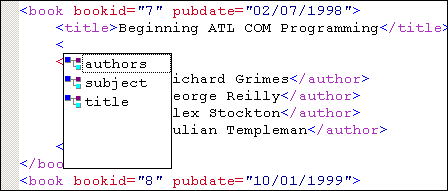
Sense:X: Intelligent XML EditingSense:X is Stylus Studio® X16 XML's implementation of Intelligent XML Editing. It is much more than XML syntax coloring, XML code sensing, and XML code completion, however. Think of Sense:X as your very own, personal XML guide, right there at your fingertips, helping you get through any XML development challenge. Intelligent XML Schema/DTD-Aware Code Sensing and Auto-CompletionStylus Studio® X16 XML's Sense:X is vastly superior to other XML editors' so-called "intelligent XML editing."
Here are a just a few examples:
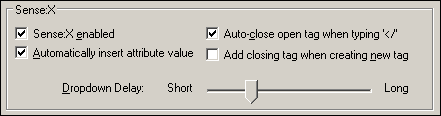
Configurable BehaviorAbsolutely everything about Sense:X is configurable, allowing you to override or customize behavior to your liking.
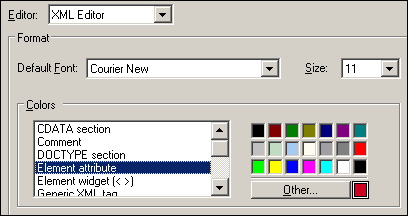
Configurable AppearanceYou can customize the appearance of all of Stylus Studio®'s editors individually. Fonts, newline format, file extensions, and so on, are all independently configurable for Stylus Studio®'s XML Editor, XSLT Editor, and XQuery Editor.
Support for Any XML Validator or XML ProcessorSense:X works with any underlying XML validation or transformation engine, including MSXML, Microsoft .NET XML (System.XML), Xerces, Xalan, Saxon, XSV, and others. Sense:X for Databases, XSLT, XQuery, XPath, Java, JSP and Web Services!Sense:X isn't limited to the XML text editor - we've implemented intelligent XML editing throughout all of our XML editing modules, including our XSLT Editor, XQuery Editor, XPath Evaluator, Java Editor, JSP Editor, Database-to-XML editor, and many others! Overall, Stylus Studio® X16 XML's Sense:X Technology
|
PURCHASE STYLUS STUDIO ONLINE TODAY!!Purchasing Stylus Studio from our online shop is Easy, Secure and Value Priced! 
Try Stylus Intelligent XML EditingSimplify XML Syntax with Stylus Studio's Intelligent XML Editing features — Download a free trial today! What's New for Stylus Studio® X16?New XQuery & Web Services Tools, Support for MySQL, PostgreSQL, HL7 EDI, Microsoft .NET Code Generation and much more! Ask Someone You KnowDoes your company use Stylus Studio? Do your competitors? Engineers from over 100,000 leading companies use Stylus Studio, and now you can ask someone from your own organization about their experiences using Stylus Studio. |

XML PRODUCTIVITY THROUGH INNOVATION ™