 Cart
Cart|
Home > XML IDE - XML Editor > XML Editor Key Features > Microsoft XML Tools > Microsoft System.XML Tools
Microsoft XML Tools
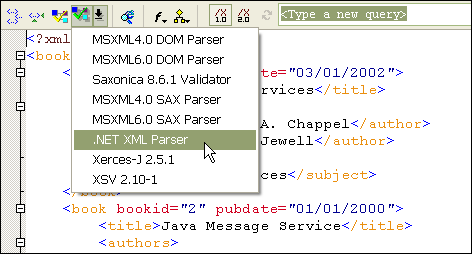
Microsoft .NET XML Tools (System.XML)Stylus Studio provides integrated development support for System.XML, the official Microsoft .NET XML processing API. By providing integrated tools support for System.XML, Microsoft developers can be assured that their development environment will be 100% compatible with their production environments. Validating XML Documents Using System.XML in Stylus StudioTo validate an XML document using Microsoft System.XML, just load an XML file, associate it with an XML schema (or generate an XML schema, then associate it (from the XML menu, select "Associate XML with Schema"), if you don't already have an XML content model to work with). Next, click on the "validate XML" button (the green checkmark icon), and select .NET XML Parser, as illustrated here:
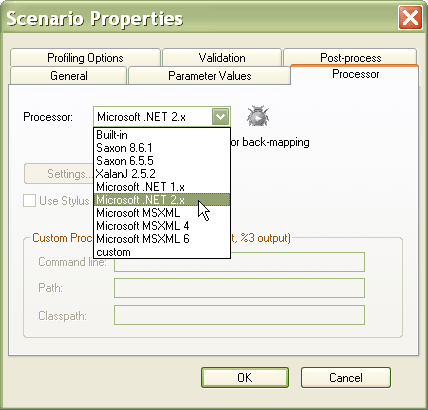
Any XML parsing or validation errors reported by Microsoft System.XML will be reported to the XML output window, and using back-mapping, you can click on the error in the output window, and Stylus Studio will highlight the error in the XML editor. Editing and Debugging XSLT Stylesheets Using System.XML in Stylus StudioStylus Studio XSLT Tools provide seamless integration with System.XML, including our XSLT editor, XSLT debugger, and XSLT profiler. To use the XSLT processing component provided in System.XML, choose Microsoft System.XML as your XSLT processor in your XSLT scenario properties, as illustrated here:
Because the integration is seamless, no other configuration changes are necessary — just edit, debug or profile your XSLT code. System.XML 1.0 Tools SupportUsing Stylus Studio's integrated support for Microsoft System.XML 1.0, you can validate XML documents using XML Schemas or DTD's, and execute & debug XSLT stylesheets, directly from within the Stylus Studio XML IDE. Microsoft System.XML 2.0 SupportStylus Studio now provides integrated support for Microsoft System.XML 2.0, the offical Microsoft .NET 2.0 XML processing API. The same support for System.XML 1.0 is offered, with the exception for XSLT debugging and XSLT profiling, however these features are planned for a future release and will be made available as a free upgrade to current AUP subscribers. |
PURCHASE STYLUS STUDIO ONLINE TODAY!!Purchasing Stylus Studio from our online shop is Easy, Secure and Value Priced! 
Try Stylus System.XML ToolsDownload a free trial of our award-winning Microsoft System.XML tools today! Learn XQuery in 10 Minutes!Say goodbye to 10-minute abs, and say Hello to "Learn XQuery in Ten Minutes!", the world's fastest and easiest XQuery primer, now available for free! Ask Someone You KnowDoes your company use Stylus Studio? Do your competitors? Engineers from over 100,000 leading companies use Stylus Studio, and now you can ask someone from your own organization about their experiences using Stylus Studio. |

XML PRODUCTIVITY THROUGH INNOVATION ™


 Next: "Microsoft MSXML Tools"