Cart
Cart|
Home > XML IDE - XML Editor > XML Editor Key Features > XML Editor > XML Schema Validator, DTD Validator
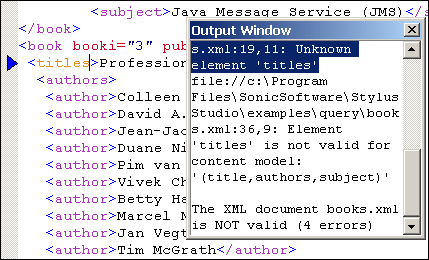
Integrated XML Schema & DTD-Based ValidationStylus Studio® X16 XML fully supports XML document validation based on XML Schema or DTDs, both through our own integrated XML Schema and DTD validator, and well as by providing complete integration with popular industry XML parsers and XML validators, including MSXML 4.0 SAX, MSXML 4.0 DOM, Microsoft .NET XML Parser (System.XML), Xerces-J 2.5.1, XSV 2.6, and so on). The ability to integrate any XML processor and XML validator with Stylus Studio®'s intuitive visual XML editors enables you to easily find and fix XML bugs, making Stylus Studio® X16 XML the standards-based XML editor of choice. Handling of Multiple Parsing or Validation ErrorsStylus Studio® X16 XML can easily handle multiple XML parsing or XML validation errors. Each error is displayed in its own Output window and includes a descriptive error message to help you understand the nature of the error.
BackmappingBackmapping is a powerful debugging/troubleshooting technology that is implemented throughout Stylus Studio® X16 XML's XML editors, linking parsing/validation errors with the offending lines of code. Backmapping is easy — simply click on an error message in the Output window, and Stylus Studio® highlights the source code that generated the error! You can cycle through all errors by pressing the F4 key.
Real-Time Syntax CheckingStylus Studio® X16 XML tracks your progress as you type, highlighting XML syntax errors in real-time. Notice, in the preceding illustration, that the Stylus Studio® X16 XML's Integrated XML Validator fully supports visual XML Schema and DTD-based validation, for easy troubleshooting/debugging of any XML document, using any XML validator you choose.
|
PURCHASE STYLUS STUDIO ONLINE TODAY!!Purchasing Stylus Studio from our online shop is Easy, Secure and Value Priced! 
Try Stylus XML DTD Validator and XML Schema ValidatorStylus Studio is the only XML editor that lets you use the XML DTD validator and XML Schema validator of your choice — Download a free trial today! What's New for Stylus Studio® X16?New XQuery & Web Services Tools, Support for MySQL, PostgreSQL, HL7 EDI, Microsoft .NET Code Generation and much more! Ask Someone You KnowDoes your company use Stylus Studio? Do your competitors? Engineers from over 100,000 leading companies use Stylus Studio, and now you can ask someone from your own organization about their experiences using Stylus Studio. |

XML PRODUCTIVITY THROUGH INNOVATION ™