 Cart
Cart|
Home > XML IDE - XML Editor > XML Editor Key Features > XSD Tools > Generate XSD
XSD Tools
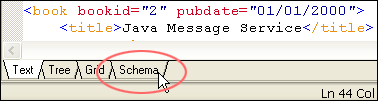
Generate XSDStylus Studio® can generate an industry standard W3C XSD (or DTD) by correctly inferring an XML data model from an XML instance document. Auto-generating an XSD with Stylus Studio® is accomplished by loading any XML document into Stylus Studio®'s XML editor and clicking on the "Schema" tab, located at the bottom of Stylus Studio®'s XML editor as shown here:
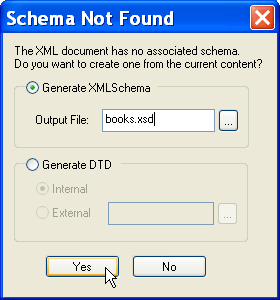
If an XML content model (expressed as an XSD or DTD) has already been assigned, Stylus Studio® will display the XML document's content model. However, if no XML content model has been assigned, Stylus Studio® will optionally generate an XSD (or DTD) for you as illustrated below. For more about the Schema tab, see our section on XML editing views.
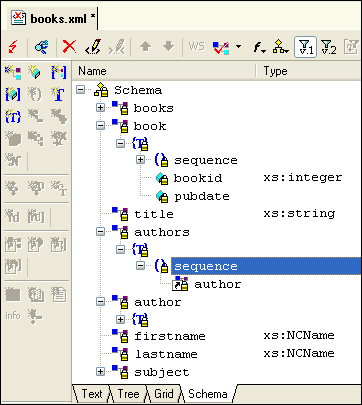
Generating an XSD (or DTD) is easy: Just type in the file name and click OK. As you can see below, Stylus Studio® correctly infers XML elements, attributes, relationships, compositor models (for example, Optional, Choice, Sequence), data type (xs:integer, xs:string, for example), element references, and so on. Of course you can further refine the generated XSD using our powerful XSD Editor.
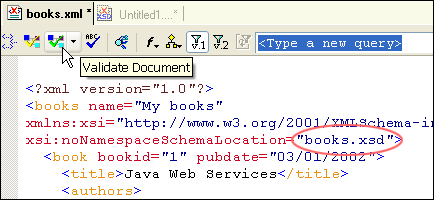
Associating the XML document with an XSDStylus Studio® inserts the XML code required to associate the XML instance document with
its newly generated XSD, so that you can easily edit and validate the XML document,
as shown here — notice how in the
Stylus Studio®'s integrated XSD generator (and DTD generator) is a powerful, complementary XSD utility that further accelerates developing and editing well-formed, valid XML documents — download a free trial today! |
PURCHASE STYLUS STUDIO ONLINE TODAY!!Purchasing Stylus Studio from our online shop is Easy, Secure and Value Priced! 
Try Stylus XSD GeneratorDownload a free trial of our award-winning XSD Generator today! Learn XQuery in 10 Minutes!Say goodbye to 10-minute abs, and say Hello to "Learn XQuery in Ten Minutes!", the world's fastest and easiest XQuery primer, now available for free! Ask Someone You KnowDoes your company use Stylus Studio? Do your competitors? Engineers from over 100,000 leading companies use Stylus Studio, and now you can ask someone from your own organization about their experiences using Stylus Studio. Related XSD Features & Tutorials |

XML PRODUCTIVITY THROUGH INNOVATION ™


 Prev: "Validate XML Using XSD"
 Next: "XSD Mapping"