 Cart
Cart|
Home > XML IDE - XML Editor > XML Editor Key Features > Web Services Tools > Web Service Tester
Web Services Tools
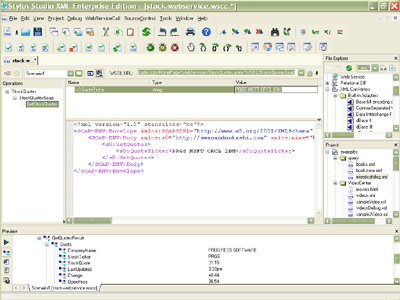
Web Service Call Composer (Web Service Tester)Stylus Studio® includes a powerful Web Service Call Composer (illustrated below) that enables you to locate and invoke Web service methods directly from within Stylus Studio® XML IDE. Stylus Studio®'s Web Service Call composer supports all of the core Web service technologies like Web Service Description Language (WSDL), Simple Object Access Protocol (SOAP), and Universal Description Discovery and Integration (UDDI) — and is an ideal Web services tool for testing Web services, inspecting WSDL files, generating SOAP envelopes, and automating or accelerating many other common XML development tasks encountered when developing Web service enabled applications.
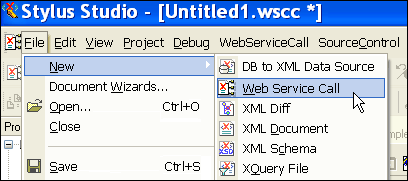
Using Stylus Studio®'s Web Service Call ComposerInvoking a Web Service method is easy with Stylus Studio®. You can launch the Web Service Call Composer by selecting File > New > Web Service Call from the main menu.
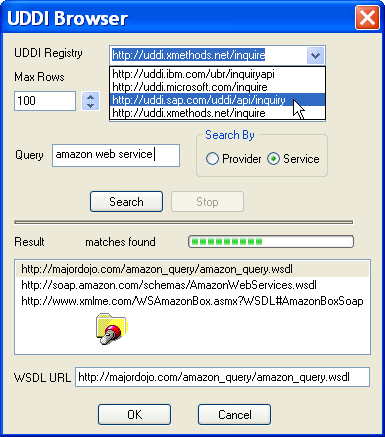
Finding a Web Service's WSDL File Using UDDIIn order invoke a Web Service, you first need to have a reference to its WSDL (Web Service Description Language) file. Since you don't always know the WSDL file URL off hand, Stylus Studio® includes an integrated UDDI directory browser that allows you to easily query any public UDDI registry and visually inspect the results. To query a public UDDI registry, such as XMethods, Microsoft, SAP, or IBM, just choose from a list of UDDI registries (or type in your own), enter a query string, for example "Amazon web service", and click Search. Stylus Studio® displays a tabular listing of the results. Choose one and click OK. Finding a Web Service's WSDL file is illustrated here:
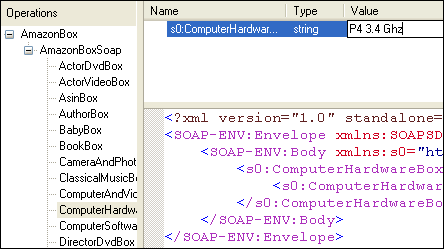
Inspecting a Web Service's WSDL FileOnce you have a handle on a Web Service's WSDL file, you can easily browse through its available Web service methods. Award-winning Stylus Studio® employs a 3-pane interface (illustrated below) to simultaneously display a Web Service's available operations, the operation's method signature (that is, its function prototype) and parameter list, and the SOAP envelope, which is generated automatically, needed to invoke the selected Web service operation. You can set the operation's parameter values by simply double-clicking a parameter's value field — Stylus Studio® automatically populates the SOAP envelope required to call the Web service, according to the parameter values you set.
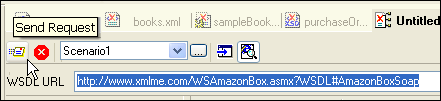
Invoking a Web Service Call with the Web Service Call ComposerOnce you've selected the Web service operation and set its paramater field values, invoking the Web service is easy — just click the "Send Request" button on the Web service toolbar, and Stylus Studio® fires off the method invocation to the Web service server specified in the WSDL file. You can abort a Web service call by clicking on the Stop button. And that's it! No additional SOAP client coding is required.
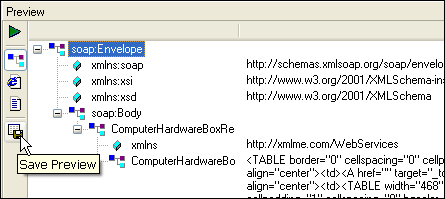
Inspecting the Results of a Web Service CallThe return value of the Web service operation is displayed in Stylus Studio®'s Preview window, which allows you to view the resulting XML in Text, Tree, or Browser views; you can also save the results to a file. Here, the Amazon.com web service has returned the HTML code needed to create a call-out box for Pentium processor related items. If you were building your own Web service enabled application, for example, you could use the returned HTML to seamlessly syndicate live content from Amazon.com on your own Web site!
Stylus Studio®'s Web Service Call Composer is a powerful tool for finding, inspecting, and invoking Web service methods. With so many other related features including XML mappers, XML Schema editors, and XSLT debuggers, Stylus Studio® is must-have Web service IDE for serious Web service application development! Next XML Web service development feature: Use Web Service Data as Input for Data Mapping |
PURCHASE STYLUS STUDIO ONLINE TODAY!!Purchasing Stylus Studio from our online shop is Easy, Secure and Value Priced! 
Try Stylus Web Services ToolsDownload a free trial or our award-winning web services tools today! What's New for Stylus Studio® X16?New XQuery & Web Services Tools, Support for MySQL, PostgreSQL, HL7 EDI, Microsoft .NET Code Generation and much more! Ask Someone You KnowDoes your company use Stylus Studio? Do your competitors? Engineers from over 100,000 leading companies use Stylus Studio, and now you can ask someone from your own organization about their experiences using Stylus Studio. XML Data SheetsStylus Studio® XML Integrated Development Environment pdf > |

XML PRODUCTIVITY THROUGH INNOVATION ™


 Prev: "Web Service Data Mapping"
 Next: "WSDL Editor"