 Cart
Cart|
Home > XML IDE - XML Editor > XML Editor Key Features > DTD Tools > NLM DTD Support
Support for US National Library of Medicine (NLM) Industry Standard DTD'sStylus Studio provides support for editing and validating XML documents using various data models defined using DTD's by the US National Library of Medicine. In this tutorial, we'll provide a step-by-step overview of how to use the NLM DTD's in Stylus Studio. Using the Catalog WizardCatalogs in XML provide a mapping from a generic addresses to specific local directories on a given machine.
In Stylus Studio, Catalogs can be used to locate the NLM DTD, system entity files, and stylesheet files during processing,
thus adding a degree of flexibility to your setup.
The 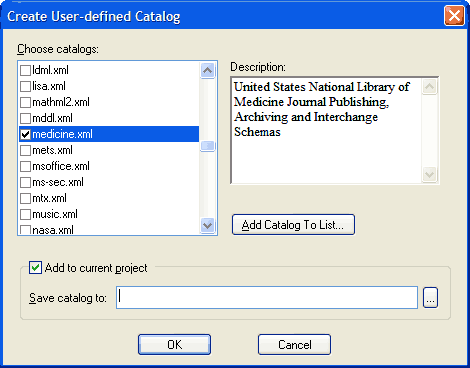 Once you've set this up, if you rearrange things or transfer to a different system, you can just edit the catalog file to remap all the old paths to new locations. This process is also demonstrated in an online video demonstration entitled: Using OASIS XML Catalogs in Stylus Studio. Delegation CatalogsNow when you're editing an XML file, Stylus Studio's XML editor automatically inserts a line of XML code which
points to the delegation catalog that refers to an online copy of 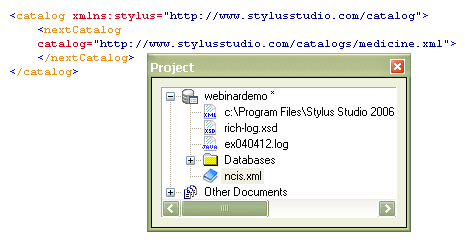 Notice how Stylus Studio automatically displays the NCIS catalog in your project window. DOCTYPE public ID completion codeStylus Studio provides syntax help for remembering the various NCIS document types, providing the public ID string from a list of choices. Our code completion understands elements and attributes, and even searches catalogs for DOCTYPE references, as illustrated here: 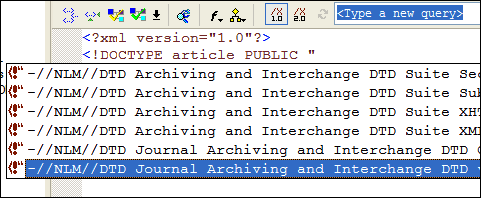 Intelligent Auto-CompletionStylus Studio's Sense:X intelligent XML editing provides auto-completion of NCIS elements and attributes. In the following illustration, Stylus Studio is suggesting several possible attributes for the <article> element. 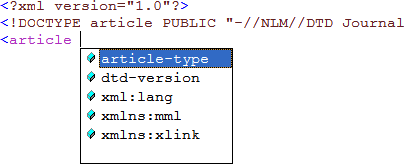
Simplify working with industry-standard XML data models including the NLM DTD's using Stylus Studio XML editing, validating and catalogs support today.
|
PURCHASE STYLUS STUDIO ONLINE TODAY!!Purchasing Stylus Studio from our online shop is Easy, Secure and Value Priced! 
Try Stylus XML ToolsSimplify working with industry-standard XML data models including the NLM DTD's using Stylus Studio: Download a free trial! What's New for Stylus Studio® X16?New XQuery & Web Services Tools, Support for MySQL, PostgreSQL, HL7 EDI, Microsoft .NET Code Generation and much more! Ask Someone You KnowDoes your company use Stylus Studio? Do your competitors? Engineers from over 100,000 leading companies use Stylus Studio, and now you can ask someone from your own organization about their experiences using Stylus Studio. Stylus Studio in the Healthcare IndustryStylus Studio is widely used in the healthcare industry by many of the world's leading medical companies. Find out if your company is one of them! |

XML PRODUCTIVITY THROUGH INNOVATION ™


