
 Cart
Cart
Home > XML IDE - XML Editor > Screenshots > Stylus Studio XQuery Mapper Screenshot


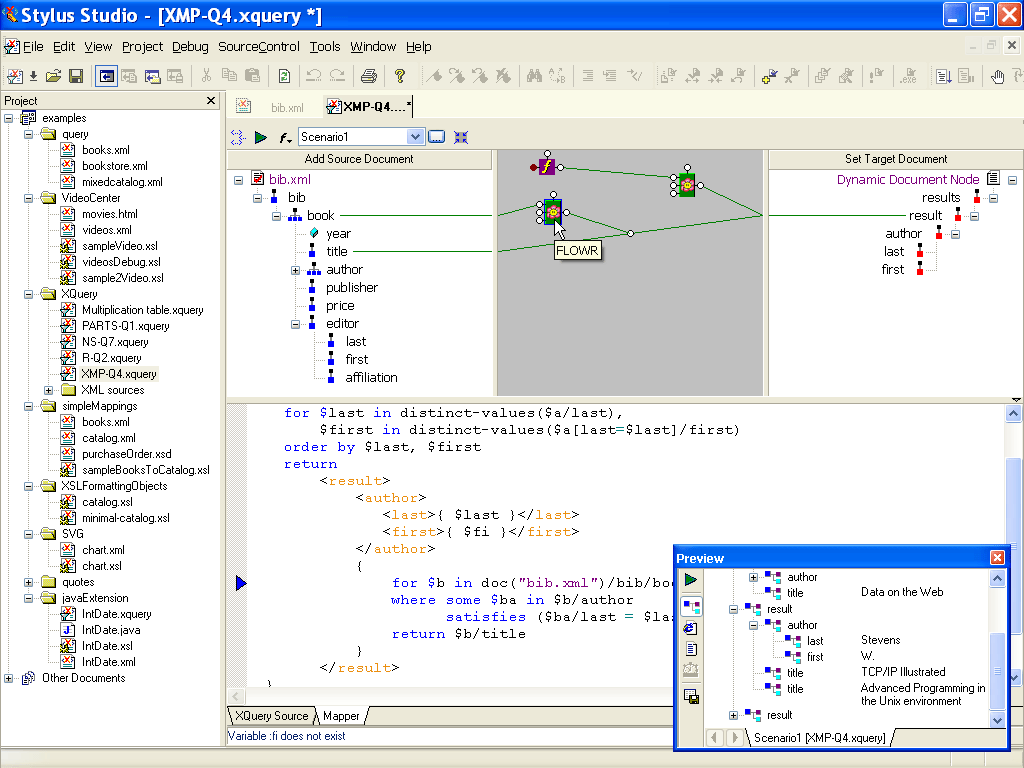
XQuery (XML Query) Mapper screenshot
Map data from XML Schemas, XML instance documents, relational databases, flat files or any other data source to XML, using the Stylus Studio® XQuery Mapper. This screenshot shows the use of varous data processing functions and FLWR (for, let where, and return) expressions used in getting data from source to destination. Stylus Studio®'s XQuery mapper features true, 2-way synchronized editing - by clicking on the "XQuery Source" tabbed-pane at the bottom of the main editing screen, you can easily view and edit the underlying XQuery code, which will be reflected in changes to the visual model. By clicking on the "Run" button (the green arrow) or by typing "F5" the query will execute and the results will be displayed in the preview window at the bottom of the screen.
Related XQuery Features and Resources
- XQuery Tools Overview
- XQuery Mapper (Visual XQuery Editor)
- XQuery Editor
- XQuery Help and Discussion Forums
- Get a free "XQuery From the Experts" Book!
More Stylus Studio Screenshots
- XML Development Environment
- Java Code Generator
- XML Diff Tool
- XML Grid Editor
- Converting to XML
- XML Mapper
- XSL Editor
- HTML-to-XML Importer
- XSL:FO Editor
- XSL Debugger
- XSLT WYSIWYG Designer
- XSLT Profiler (Optimize XSLT Stylesheets)
- XML Schema Designer
- XML Schema Mapper
- XML Schema Validator
- XML Schema Documentation Generator
- OASIS Catalog Support
- Database-to-XML Data Source Editor
- Document Type Definition Editor
- XQuery Mapper
- XQuery IDE
- XQuery Debugging
- XQuery Profiler (Optimize XQuery Expressions)
- Web Service Call Composer (SOAP Tester)
- Java IDE