
 Cart
Cart
Home > XML IDE - XML Editor > Screenshots > XML Grid Editor


XML Grid Editor
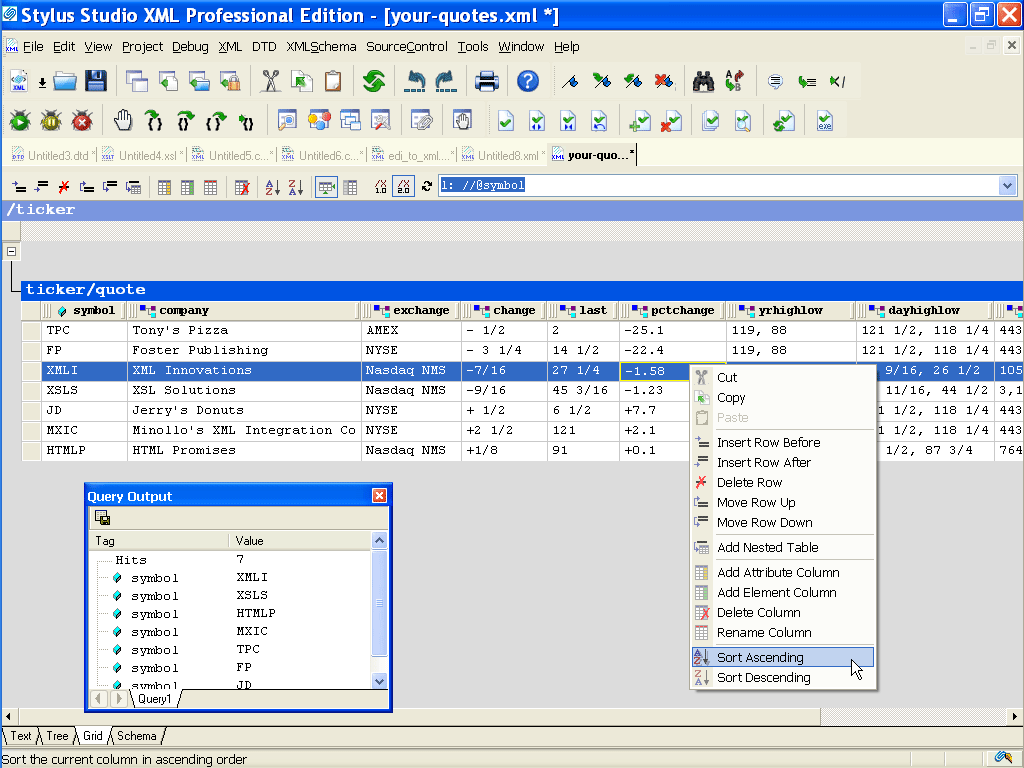
Stylus Studio®'s XML Grid Editor spreadsheet-like XML editing interface provides a familliar way to add/delete/insert rows, modify element and attribute names, sort columns, and visualize tabular XML data structures that are so common in XML application development. The illustration also shows an integrated XPath Analyzer, and many other handy XML editing options that are available from the short-cut menu. The XML Grid Editor is synchronized with Stylus Studio®'s other XML editing views, including Text View and Tree View — changes you make in one view are immediately reflected in the others. An introduction to XML editing using the XML Grid View demonstrates the power of the XML Grid View!
More Stylus Studio Screenshots
- XML Development Environment
- Java Code Generator
- XML Diff Tool
- XML Grid Editor
- Converting to XML
- XML Mapper
- XSL Editor
- HTML-to-XML Importer
- XSL:FO Editor
- XSL Debugger
- XSLT WYSIWYG Designer
- XSLT Profiler (Optimize XSLT Stylesheets)
- XML Schema Designer
- XML Schema Mapper
- XML Schema Validator
- XML Schema Documentation Generator
- OASIS Catalog Support
- Database-to-XML Data Source Editor
- Document Type Definition Editor
- XQuery Mapper
- XQuery IDE
- XQuery Debugging
- XQuery Profiler (Optimize XQuery Expressions)
- Web Service Call Composer (SOAP Tester)
- Java IDE