
 Cart
Cart
Home > XML IDE - XML Editor > Screenshots > XML Development Environment


XML Development Environment
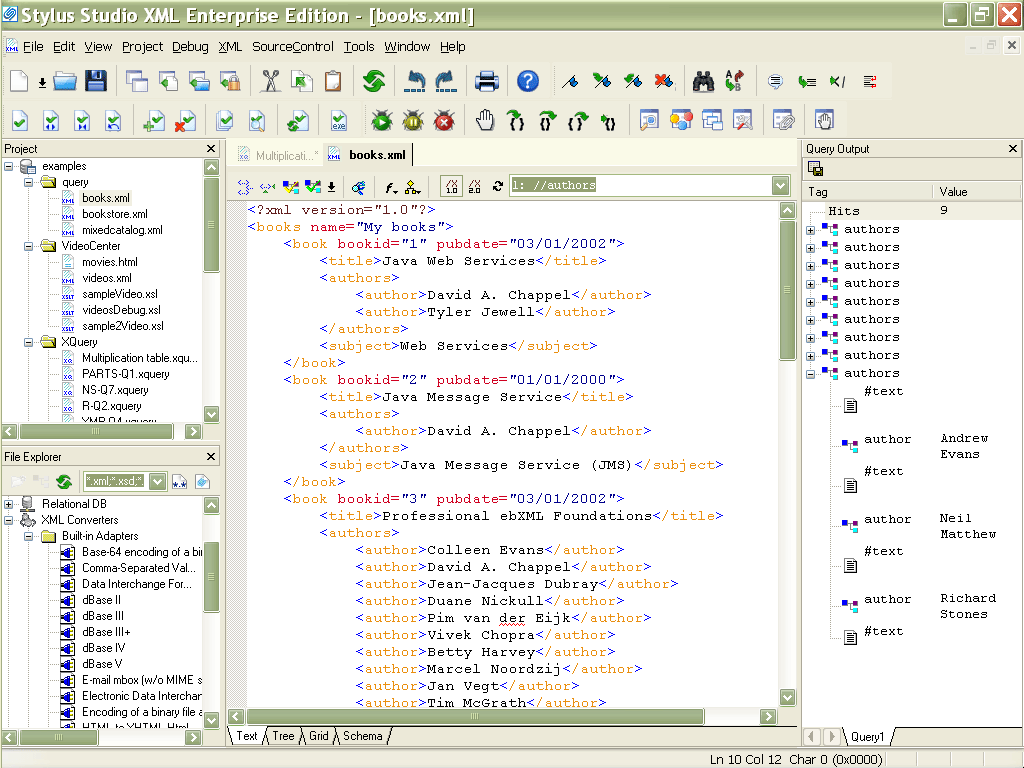
This screenshot shows an overview of Stylus Studio®'s, the world's leading XML Development Environment, featuring the left, a a project window for managing XML files, a main XML editing window in the center, and on the right side is a Query Output Window, visually displaying the results the "//authors/author[1]" XPath Expression typed into the XPath Expression Evaluator. Clicking on a row in the Query Output Window will result in a highlighting of the node in the source XML document - this feature is known as "backmapping" and is implemented throughout Stylus Studio®. The main editing window features a tabbed pane at the bottom, alowing you to switch from an XML grid view for editing tabular XML data, an XML text view for manual editing of XML files, and XML tree editing view for working with large documents.
Related XML Editing Features
- A technical overview of the Stylus Studio® XML Editor
- Learn about Sense:X, intelligent XML-aware editing features in Stylus Studio®
- Learn about Stylus Studio®'s Support for any XML parser
More Stylus Studio Screenshots
- XML Development Environment
- Java Code Generator
- XML Diff Tool
- XML Grid Editor
- Converting to XML
- XML Mapper
- XSL Editor
- HTML-to-XML Importer
- XSL:FO Editor
- XSL Debugger
- XSLT WYSIWYG Designer
- XSLT Profiler (Optimize XSLT Stylesheets)
- XML Schema Designer
- XML Schema Mapper
- XML Schema Validator
- XML Schema Documentation Generator
- OASIS Catalog Support
- Database-to-XML Data Source Editor
- Document Type Definition Editor
- XQuery Mapper
- XQuery IDE
- XQuery Debugging
- XQuery Profiler (Optimize XQuery Expressions)
- Web Service Call Composer (SOAP Tester)
- Java IDE