 Cart
Cart|
Home > XML IDE - XML Editor > XML Editor Key Features > EDI Tools > Validating EDIFACT
Validating EDIFACT Documents with XML SchemasEither before or after transforming EDIFACT content, we should make sure that we have all of the necessary components, our codes are in our codelists, and everything is in the right places. Stylus Studio® includes a dictionary containing the EDIFACT standards across multiple versions. From this, the following steps will let us validate an EDIFACT document.
Once we've gone through these four steps, subsequent validations of the same document structure will be even shorter. If we use our project window and assign that schema to a folder therein, any EDIFACT Document URL placed into that project folder will get validated with the given schema. Open the EDIFACT document as XMLUse File|Open and select your EDIFACT document. This demonstration uses the sample file edifact-sample.txt available on this server. Before pressing the Open button, check the the box labeled Convert to XML using adapter. Another dialog asking for which adapter will come up. Choose the "Electronic Data Interchange (EDI)" adapter and press OK. Your EDIFACT document will now be opened in the XML editor, as fully-commented XML. 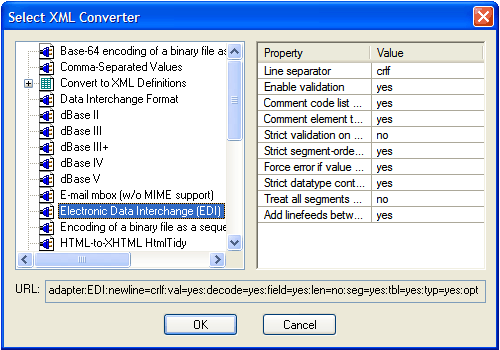 (click to enlarge) 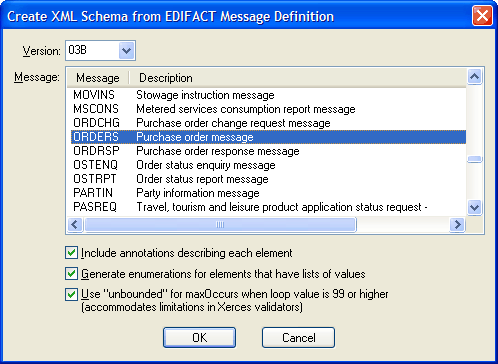 (click to enlarge) Create the corresponding XML schemaNow you need to generate a matching schema. If you're not sure which message type or which version the EDIFACT files is from, just look in the editor. There will be a line that starts like this: <UNH0201><!--0065: Message type-->ORDERS</UNH0201>
and that's your message type — in this sample <UNH0203><!--0054: Message release number-->03B</UNH0203>
which contains your version number. Use File|Document Wizards...|EDIFACT to XML Schema and choose version 03B of message ORDERS and a new tab will open with the newly-generated XML Schema that cooresponds to the content of the EDIFACT file you just converted. Do File|Save As... and save it as 03B-ORDERS.xsd. You now have a reusable XML Schema file for validating EDIFACT version D03B Purchace Order Messages. 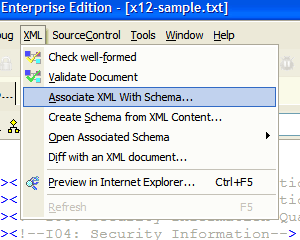 (click to enlarge) Attach the schema to the documentNext we need to associate this schema with our document. Go to the menubar and choose XML|Associate XML With Schema... and then open the XSD file you just saved. In a few seconds, the tags should change color to indicate that a schema was found and that they are a valid part of the schema. ValidatePress the This can be used to make sure the EDIFACT input you are receiving matches what you expect. It can also be used at the result end of an XQuery or XSLT transform to make sure your output has valid content — which is especially useful to do before writing through the EDI adapter to turn it into valid EDIFACT. It's phenomenal to consider what we've just done. We've used two completely different technologies — EDIFACT and XML Schema (with completely unrelated ancestries) — and we've used them together in a new way to solve the tough problem of validating EDI. You can use these same features in your projects as well: see details about using the embedded XML converters directly and in conjunction with XSLT and XQuery.
|
PURCHASE STYLUS STUDIO ONLINE TODAY!!Purchasing Stylus Studio from our online shop is Easy, Secure and Value Priced! 
Try Stylus EDI ToolsSimplify working with Electronic Data Interchange (EDI) with Stylus Studio®'s award-winning EDI Tools — Download a free trial of our today! Attend a Live Webinar This Week!Learn about Stylus Studio's unique features and benefits in just under an hour. Register for the Stylus Studio QuickStart Training WebCast! Ask Someone You KnowDoes your company use Stylus Studio? Do your competitors? Engineers from over 100,000 leading companies use Stylus Studio, and now you can ask someone from your own organization about their experiences using Stylus Studio. Stylus Studio® EDIFACT ZoneSimplify your next legacy data integration project with the help of the EDIFACT Zone, the world's largest, free online reference covering all EDIFACT and UN/CEFACT versions. Related XSD Features & Tutorials |

XML PRODUCTIVITY THROUGH INNOVATION ™


 button and your EDIFACT file can now
be validated against the XML Schema you just created.
button and your EDIFACT file can now
be validated against the XML Schema you just created.