Cart
Cart
|
Home >Online Product Documentation >Table of Contents >Importing EDI Standard Definitions Importing EDI Standard DefinitionsThis section describes how to import EDI standard definitions. You might want to do this, for example, to import code list values from a more recent version of a dialect while leaving the rest of the EDI standards on which your EDI to XML conversion is based intact. In the following example, we are importing the Late Reason Code code list from X12 version 005050 into our EDI to XML conversion, which is based on X12 version 004030, to acquire a new code value - LB = Awaiting Wage Amount Verification. To import an EDI standard definition:
1. Open the EDI to XML conversion whose EDI structure you want to update by importing an EDI Standard.
2. In the EDI Structure pane, select the definition you want to import.
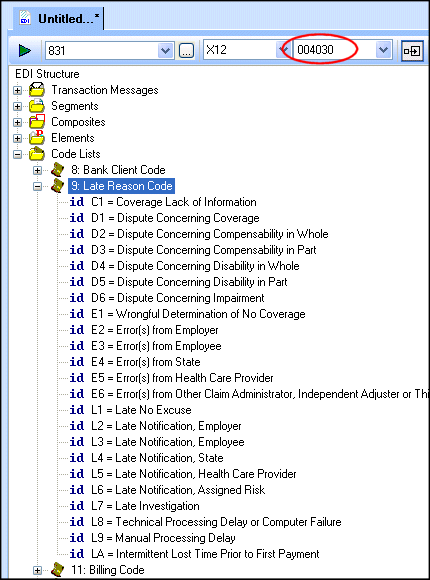
Here, we have selected 9: Late Reason Code. Note that the last code defined for this code list (in version 004030) is LA = Intermittent Lost Time Prior to First Payment.
3. Change the value in the Select Version field to 005050.
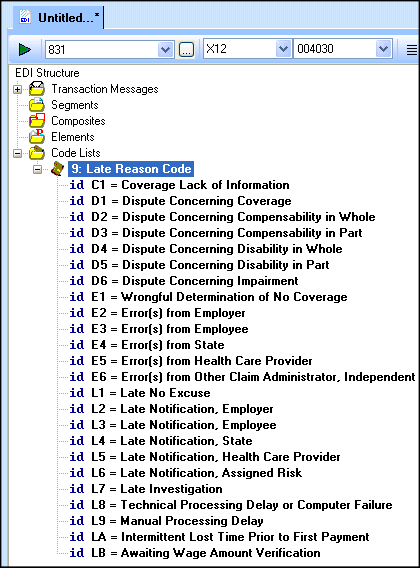
This displays the EDI structure for X12 version 005050 in the EDI Structure pane. Note that the Late Reason Code code list includes LB = Awaiting Wage Amount Verification.
4. Right-click the code list 9: Late Reason Code, and choose Import Definition from the shortcut menu.
This directs Stylus Studio to import the codes for this code list from X12 version 005050 into the local EDI Structure.
5. Change the version back to 004030 (since this is the version on which the EDI to XML conversion is based).
6. Click the Show Full Dialect Specification button (
 ). Note that the 9: Late Reason Code code list appears in bold to indicate that a local copy of this definition has been created.
|

XML PRODUCTIVITY THROUGH INNOVATION ™