|
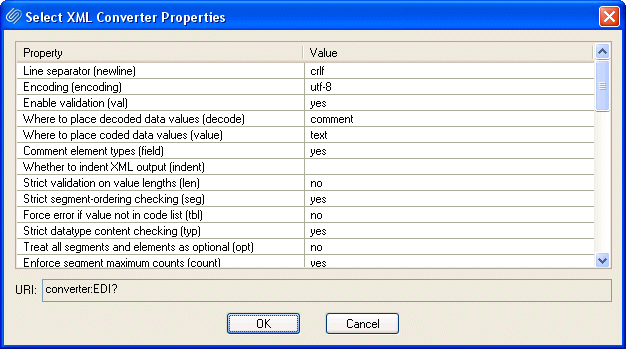
Home >Online Product Documentation >Table of Contents >Specifying XML Converter Properties Specifying XML Converter PropertiesThe EDI to XML module uses the DataDirect XML Converter engine to convert EDI documents to XML. You specify the properties you want the XML Converter engine to use for your EDI to XML conversion in the Select XML Converter Properties dialog box: The settings you specify here are saved with the SEF file for your EDI to XML conversion and are displayed in the URI field (in converter:EDI URI scheme format) at the top of the EDI to XML editor. To display the Select XML Converters dialog box:
Click the Edit Converter Properties button ( |

Telecommunications Companies That Use Stylus Studio
Can you here me now? When it comes to telecommunications and XML it can get a little fuzzy. That's why these top telecommunication companies turn to Stylus Studio to connect them to their XML needs.
Editing XSL Stylesheets
Learn how our powerful XSL stylesheet editor with built-in preview capabilities and synchronized visual and text-based stylesheet editors simplifies XSL and XSLT stylesheet development.
Create XML Schema from XML Content
Create XML Schema from XML Content by auto-generating an XML Schema with Stylus Studio.
XQuery and Web Services
XQuery provides a flexible means for data abstraction, while Web services provide process abstraction. In this online video demonstration, learn how integrated XQuery & Web service tools simplify development of XQuery-based Web service applications.