Cart
Cart
|
Home > Online Product Documentation > Table of Contents > XSL-FO Nodes XSL-FO Nodes
XSL-FO nodes convert their input to PDF using the FO processor specified in the XML pipeline's execution framework. See Specifying an Execution Framework for more information on this topic.
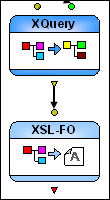
They are created automatically when an XQuery or XSLT document that specifies post-processing is dropped directly onto the XML pipeline canvas. You can also create one by dragging the XSL-FO icon from the s. The only property you can specify for an XSL-FO node is its name. Input PortXSL-FO nodes have a single input port that you use to specify the XML to be converted to PDF. This node expects XML defined using the FO grammar. You can specify a default value, or the value can be dynamic (the output from another node in the XML pipeline, for example). XSL-FO nodes are typically piped to XQuery and XSLT nodes, but they can be piped to any node that outputs XML using the FO grammar. Output PortsXSL-FO nodes have a single output port, used to specify what to do with the result of the transformation. Typically you use the Copy to URL property to write the output PDF to a file system, but you could also pipe it to a converter that does something with the PDF, or to a Pipeline Output node. |

XML PRODUCTIVITY THROUGH INNOVATION ™