XML Parser Nodes

Note


You cannot use an XML Parser node in an XML Pipeline for which you plan to generate C# code.

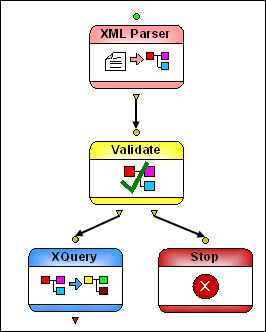
XML Parser nodes convert text input to an XML document.

Figure 424. Example XML Parser Node Implementation

Input Port

XML Parser nodes have a single input port that you use to specify the text to be converted to XML. You can specify a default value, or the value can be dynamic (the output from another node in the XML pipeline, for example).

Output Ports

XML Parser nodes have a single output port, used to specify what to do with the result of the transformation. You can

  • Use the Copy to URL property to write the output to a file system
  • Pipe the output to another node (like Validate, for example)
  • Or both

An output must be specified in order for the node to be processed.

XML to PDF

Convert XML to PDF using Stylus Studio's XML publishing tools - the easiest way to design beautiful document layouts for use in XSL:FO based multi-channel publishing and single source publishing applications.

Introduction to the XQuery Mapper

This free online video demonstration covers Stylus Studio's synchronized XQuery editing and mapping tool which allows you to create any XQuery expression, either manually using Stylus Studio's XQuery editor.

XML Differencing

Stylus Studio's integrated XML Differencing tool visually computes and analyzes any changes made to files or folders in a highly configurable, XML-aware fashion. Display text or tree views, with changes displayed in a merged view or side-by-side!

XML Schema Tutorial

An XML Schema Tutorial that explores real-world XML Schema development issues, XML Schema examples and various use cases.

Stylus Most Wanted

Site Map | Privacy Policy | Terms of Use | Trademarks
Free Stylus Studio XML Training:
W3C Member
Stylus Studio® and DataDirect XQuery™are products from DataDirect Technologies, is a registered trademark of Progress Software Corporation, in the U.S. and other countries. © 2004-2007 All Rights Reserved.