Chapter 1 Getting Started with Stylus Studio® 2008


Stylus Studio ® 2008 (Stylus Studio) is an integrated development environment (IDE) for XML and related technologies. Stylus Studio allows you to design, develop, and test XML applications using its intuitive graphical interface, textual editors, and debuggers for XML, XML Schema, DTD, XQuery, XSLT, Web services, and Java.

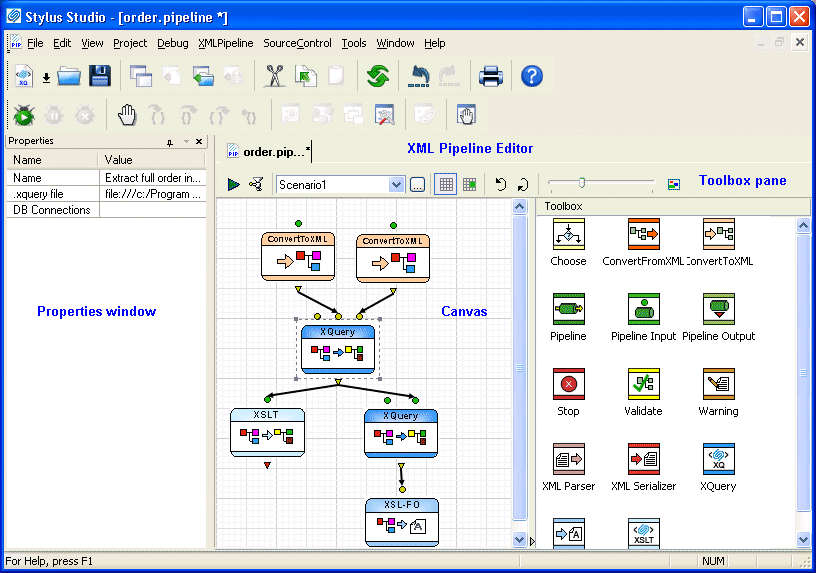
Figure 1. Stylus Studio's XML Pipeline Editor

Stylus Studio includes modules for:

  • XML
  • XQuery
  • XSLT
  • XML Pipelines
  • XML reporting
  • Relational data sources
  • DTD
  • XML Schema
  • Web services
  • Java
  • Converting non-XML files to XML, and vice versa

Each module has one or more editors to help you author, edit, and debug XML applications.

This chapter provides a tour of the basic operations Stylus Studio provides with each of its modules. It also includes information about opening files in any module, using projects to organize files, and setting options that affect all modules.

This chapter is organized as follows:

XQuery Integration

Learn how new XQuery technologies can simplify legacy data integration by leveraging industry standards, proven open-source XML processing components, and Stylus Studio's integrated XQuery & XML tools.

XML Project

Stylus Studio's Project Window is an intuitive, visual feature for organizing files belonging to a project. It supports different file-type icons and nested folders; many helpful options are available from the context menu.

Create XML Schema from XML Content

Create XML Schema from XML Content by auto-generating an XML Schema with Stylus Studio.

Stylus Most Wanted

Site Map | Privacy Policy | Terms of Use | Trademarks
Free Stylus Studio XML Training:
W3C Member
Stylus Studio® and DataDirect XQuery™are products from DataDirect Technologies, is a registered trademark of Progress Software Corporation, in the U.S. and other countries. © 2004-2007 All Rights Reserved.