XML Serializer Nodes

Note


You cannot use an XML Serializer node in an XML Pipeline for which you plan to generate C# code.

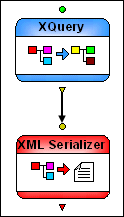
XML Serializer nodes convert an XML document to text. You can use node properties to specify characteristics of the resulting text file, such as whether or not you want it to include an XML declaration, and whether or not to use pretty-print to format it.

Figure 425. Example XML Serializer Node Implementation

Input Port

XML Serializer nodes have a single input port that you use to specify the XML to be converted to text. You can specify a default value, or the value can be dynamic (the output from another node in the XML pipeline, for example).

Output Ports

XML Serializer nodes have a single output port, used to specify what to do with the result of the transformation. You can

  • Use the Copy to URL property to write the output to a file system
  • Pipe the output to another node
  • Or both

XQuery Profiler

Stylus Studio's XQuery Profiler allows you to benchmark any XQuery expression, and it helps you locate and eliminate performance bottlenecks for maximum XQuery performance.

Binary XML

How do I get my binary data into XML? How do I get my binary data out of XML? The answers to these questions and more in this amazing Binary XML tutorial.

Medical Companies That Use Stylus Studio

Medical companies can't solve every ache and pain. That's why when it comes to the struggle of data integration, they turn to Stylus Studio to simplify their pains. Come see which medical companies are injecting Stylus Studio into their work load!

Investments and Financial Companies That Use Stylus Studio

Stylus Studio provides XML tools & components to leading investment and financial companies! See which top investment and financial companies are banking on Stylus Studio 2006 to simplify their dollars and cents.

Stylus Most Wanted

 
Free Stylus Studio XML Training:
W3C Member