|
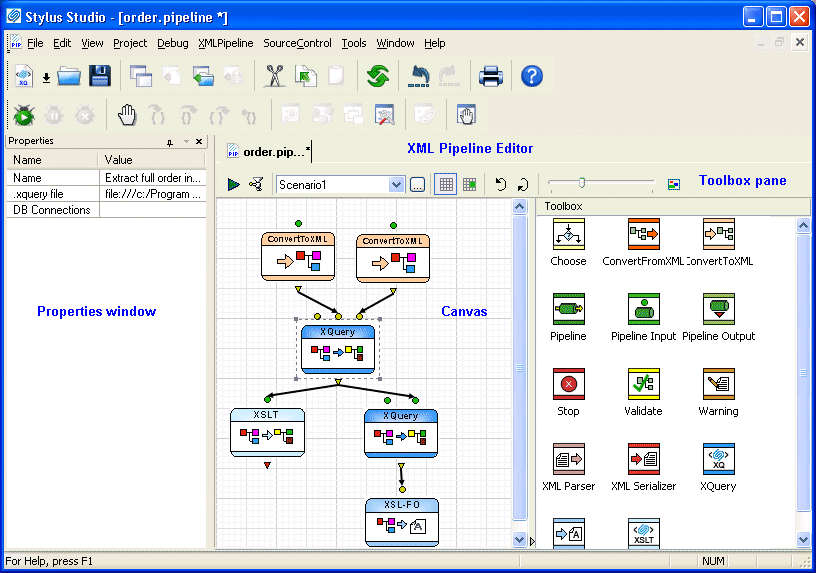
Home > Online Product Documentation > Table of Contents > The XML Pipeline Editor The XML Pipeline EditorThe XML Pipeline Editor is the visual editing tool you use to create, execute, and debug XML pipelines in Stylus Studio.
You build an XML pipeline in the XML Pipeline Editor using simple drag-and-drop actions - to add an XQuery query to an XML pipeline, for example, you can drag an XQuery file from the Project window and drop it on the XML Pipeline Editor canvas. You can also use tools from the Toolbox pane to add nodes to your XML Pipeline. The Properties window allows you to specify settings for the node (default input and output values, for example). You can also use the XML Pipeline Editor to This section covers the following topics: |

XML-to-XML Mapper
XML to XML mapping tools in Stylus Studio provide a powerful visual interface for mapping XML data from-and-to virtually any data format using industry-standard XSLT and XQuery technologies.
The Official XQuery FAQ
This is the official list of Frequently-Asked Questions about the World Wide Web Consortium's XML Query Language (XQuery).
XML Unicode Encoding
Stylus Studio supports over 300 different file encodings, including UTF-8, UTF-16, EUC-JP, SHIFT-JIS, and more, alowing you to work with any XML document. Robust text editors support standard editing features, and Sense:X intelligent auto-completion.
Stylus Studio Product Documentation
Stylus Studio product documentation consists of The Stylus Studio 6 User's Guide, An online Help system, Release Notes to keep you up to date with Stylus Studio's continuing innovations and enhancements.