Specifying an Execution Framework

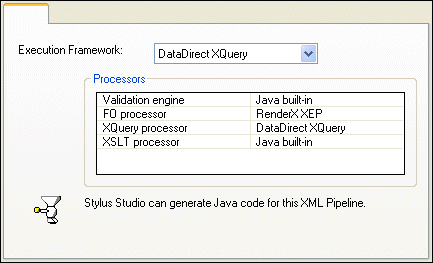
To help you manage processor settings for the XQuery, XSLT, XML Schema validation, and FO processing operations in your XML pipeline, Stylus Studio lets you specify an execution framework in the Scenario Properties dialog box.

Figure 392. Execution Framework Settings for an XML Pipeline

Each execution framework is associated with a pre-set collection of compatible processors. You can

  • Change the execution framework to use a different set of processors.
  • Change the settings for individual processors within an execution framework. Any changes you make to settings within an execution framework affect the current pipeline only, and not the execution framework's default settings.

Tip


Stylus Studio displays information about whether or not it can generate code based on the current processor settings.

When to Specify the Execution Framework

If the production or deployment environment anticipated for the XML pipeline uses different processors than those specified in the default execution framework, you should consider changing these settings early in the XML pipeline's development phase. Doing so will enable you to preview and debug the XML pipeline's performance and output in an environment that models the production environment as closely as possible. In any event, you need to make sure that the Processor settings on the Deployment page of the Scenario Properties dialog box are set appropriately prior to generating code for your XML pipeline. See Generating Code for an XML Pipeline for more information on this topic.

HTML to XML Importer

Convert HTML to XML with the Stylus Studio HTML to XML Importer, a powerful, visual utility for Converting HTML to XML with ease.

Using DTD in Microsoft Applications

Learn how to integrate DTD's into your Microsoft applications using MSXML or System.XML DTD processing components.

XML Reports

Build beautiful XML reports from Relational, XML and Legacy Data. You XML report can be rendered in PDF or HTML using XSLT, XQuery or XSL:FO.

OASIS Catalogs for Fun and Profit

This tutorial about, Understanding Catalogs, A Use-Case for Catalogs, Registering Catalogs in a Project, Using the DOCTYPE Syntax Sense:X Aid, Navigating Catalogs, Building Composite Catalogs, Converting TR9401 Catalogs to OASIS XML Catalogs and more

Stylus Most Wanted

Site Map | Privacy Policy | Terms of Use | Trademarks
Free Stylus Studio XML Training:
W3C Member
Stylus Studio® and DataDirect XQuery™are products from DataDirect Technologies, is a registered trademark of Progress Software Corporation, in the U.S. and other countries. © 2004-2007 All Rights Reserved.