|
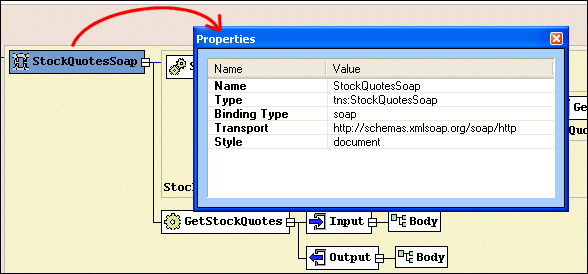
Home > Online Product Documentation > Table of Contents > Properties Window Properties WindowYou use the Properties window to set values for WSDL elements.
Not all element values can be set using the diagram pane - the Binding element's transport type, for example. You can write the necessary XML by hand in the text pane if you choose, but it can be easier, faster, and less error-prone to set these values using the drop-down lists for Values fields in the Properties window.
|

Export HTML to XML
Export HTML to XML with the click of a button - simplify migration of legacy HTML code to industry standard XML technologies with Stylus Studio.
Berkeley DB XML and Stylus Studio
Develop XML applications for Berkeley DBXML with Stylus Studio integrated tools support for SleepyCat Software's DBXML. Open, Query and Save XML to and from Berkeley DB XML directly from within the Stylus Studio XML IDE.
XML Schema Designer
The XML Schema Designer is a tool for accelerating advanced XML Schema development through an intuitive visual interface for modeling any XML data structures.
Web Service Servers
Stylus Studio's Web Services tools support development and testing of Web service applications on the industry's leading Web Service Servers including Apache AXIS, Mirosoft SOAP Client Toolkit and Microsoft .NET Server.