|
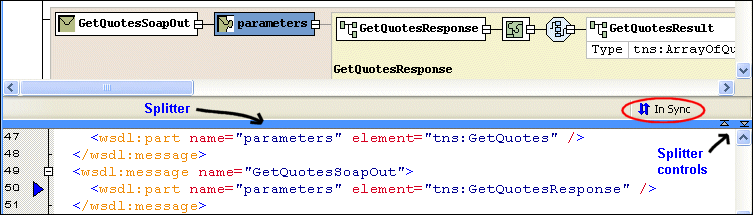
Home > Online Product Documentation > Table of Contents > Text Pane Text PaneThe text pane appears below the diagram pane. The two panes are separated by a horizontal splitter, as shown in Figure 377. If you want, you can display WSDL document text and the diagram at the same time, using the splitter to change the relative size of the text and diagram panes. You use the splitter controls to hide either the text pane or the diagram pane with single click.
As you edit the document, using either the diagram or text area, Stylus Studio displays informational messages as changes are being made and when the two views are synchronized. Text and diagram views are synchronized automatically.
The default font for text is Courier New, but you can change it to whatever font you want by clicking the
Change Font button (
|

Forest & Paper Products
Many forest & paper product companies realize the best XML suite doesn't have "pay per" features. That's why these top forest & paper product companies choose Stylus Studio 2006 to get the world's best XML features all in one bundle!
Business Solutions & Outsourcing
Business Solutions & Outsourcing companies know the best solutions. That's why they choose Stylus Studio to enhance their business productivity. See which companies are already using Stylus Studio 2006 to take care of their own business!
Translating X12 Documents to XML
The X12 to XML Converter is a built-in function of the adapter library. The XML that is generated is well commented and indented, and can be used anywhere XML is normally used — with XML Schemas, XSLT, XQuery, etc.
Berkeley DB XML and Stylus Studio
Develop XML applications for Berkeley DBXML with Stylus Studio integrated tools support for SleepyCat Software's DBXML. Open, Query and Save XML to and from Berkeley DB XML directly from within the Stylus Studio XML IDE.