Background Color

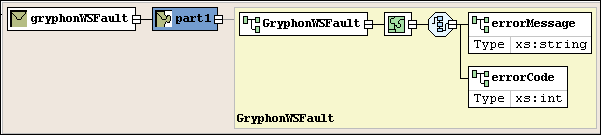
Background color is used as another visual cue for information about the WSDL document or the XML Schema it might contain:

  • A tan, or light brown, color identifies global nodes - these are elements that are defined as children of the WSDL ( wsdl:definitions). In Figure 381, the gryphonWSFault Message is an example of a such a node.
  • A light yellow background identifies local instances of globally defined types. In Figure 381, the GryphonWSFault element is a local instance of that type.

Figure 381. Background Colors Show Global and Local Types

Translating X12 Documents to XML

The X12 to XML Converter is a built-in function of the adapter library. The XML that is generated is well commented and indented, and can be used anywhere XML is normally used — with XML Schemas, XSLT, XQuery, etc.

DTD Validator

This page talks about Stylus Studio's DTD Validator it has the ability to specify any third-party XML parsers and validators, real-time syntax checking and DTD validation error reporting, backmapping, integrating third-party DTD validators and more!

MSXML - Microsoft XML Tools

MSXML tools in Stylus Studio feature integrated XML validation, XSLT transformation and XSLT debugging using the Microsoft's COM-based XML processing components: MSXML 3.0, MSXML 4.0 and MSXML 6.0

XML Code Folding

Stylus Studio's XML Editor features XML code folding, a powerful and intuitive way to maximize limited screen real-estate and help make sense of large XML files.

Stylus Most Wanted

 
Free Stylus Studio XML Training:
W3C Member