Using the WSDL Editor

The WSDL Editor is a graphical and text editor that lets you review, compose, and edit WSDL documents in Stylus Studio.

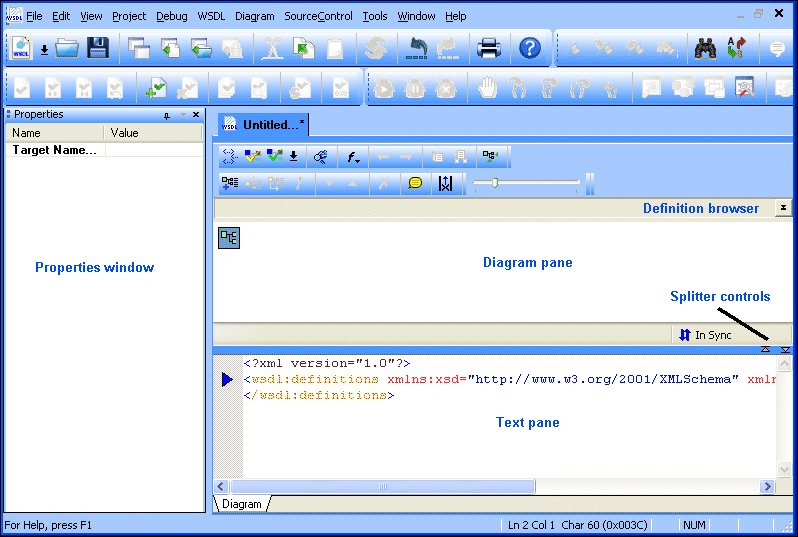
Figure 375. WSDL Editor

The WSDL Editor consists of a

  • Diagram pane, which contains graphical representations of the elements, attributes, and other nodes that make up your WSDL document.
  • Text pane, which displays the code for the WSDL document.
  • Properties window, which shows properties for the selected WSDL element.
  • Definition browser, which allows you to quickly navigate to a specific WSDL element or embedded XML Schema.

This section covers the following topics:

Building Web Services With Stylus Studio

This video demonstration shows you how to use Stylus Studio's Web Service call composer to locate a WSDL file on the Internet, inspect, create SOAP envelope, invoke and inspect Web service data.

Flat File to XML Mapper

Convert any flat file to XML in 3 clicks or less using the Stylus Studio Flat File to XML Mapper. Supports tons of different file encodings: UTF-8, UTF-16, US-ASCII, ISO-8859-1, and more.

XML File Explorer

The XML File Explorer provides a productive, consistent, and easy-to-use interface for working with any data sources (relational data, EDI, binary, XML, CSV, and more) used in enterprise data integration projects.

XML Publisher - XSLT Generator and XSL:FO Generator

The XML Publisher lets you easily design beautiful documents in HTML or PDF format from relational, XML and other data sources using XSL:FO or XSLT, using an intuitive visual interface.

Stylus Most Wanted

Site Map | Privacy Policy | Terms of Use | Trademarks
Free Stylus Studio XML Training:
W3C Member
Stylus Studio® and DataDirect XQuery™are products from DataDirect Technologies, is a registered trademark of Progress Software Corporation, in the U.S. and other countries. © 2004-2007 All Rights Reserved.