Validating XQuery Results

You can optionally validate the XML document that results from XQuery processing. You can validate using the

  • Stylus Studio built-in processor. If you use the Stylus Studio built-in processor, you can optionally specify one or more XML Schemas against which you want the result document to be validated.
  • Any of the customizable processors supported by Stylus Studio, such as the .NET XML Parser, Xerces-J, and XSV.
To validate XQuery scenario result documents:
1. Open the XQuery whose results you want to validate.
2. In the XQuery Editor, in the scenario name field, click the down arrow and click the name of the scenario for which you want to perform validation.
3. Click Browse to open the Scenario Properties dialog box.
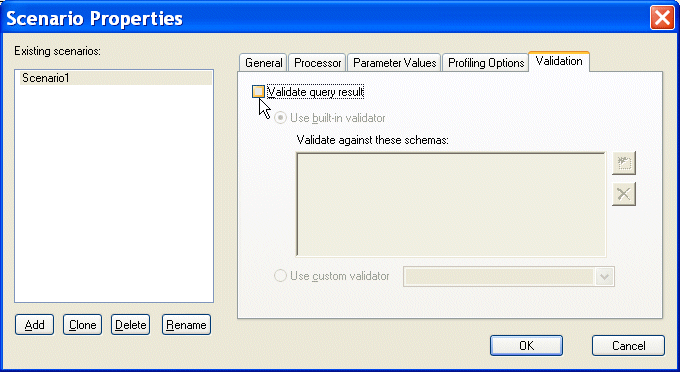
4. Click the Validation tab.

Figure 346. Validation Tab for XQuery Scenarios

5. Click Validate query result.
6. If you are using Stylus Studio's built-in validation engine, optionally, specify the XML Schemas against which you want to validate the XML result document. Otherwise, go to step 7
a. Click the Open file button ( ).

The Open dialog box appears.

b. Select the XML Schema you want to use for validation.
c. Click the Open button to add the XML Schema to the Validation tab.
d. Optionally, add other XML Schemas.
e. Go to step 8.
7. Click the Use custom validator button, and select the validation engine you want to use from the drop-down list box.
8. Click OK.

EDIFACT Standards Available Across All Versions

The complete EDIFACT Standards Grid, listing all EDIFACT versions across the top, and the corresponding messages down the left side.

XSD Documentation Generator

Stylus Studio®'s XSD Editor includes an integrated XSD documentation generator, allowing you to easily publish XML content models defined in XSD in a convenient, HTML format.

Support for the Saxon XQuery Processor

Stylus Studio's XQuery tools feature integrated support for the Saxon SA 8.7.3 XQuery and XSLT processor so you can Edit, Debug and Run XQuery using Saxon. Java code generation support lets you deploy Saxon XQuery applications with just one click.

XML Spell Checker

The Stylus Studio Spell Checker is integrated with our intuitive XML Text Editor. It highlights typographical errors as you type and lets you easily search, replace, and build custom dictionaries.

Stylus Most Wanted

Site Map | Privacy Policy | Terms of Use | Trademarks
Free Stylus Studio XML Training:
W3C Member
Stylus Studio® and DataDirect XQuery™are products from DataDirect Technologies, is a registered trademark of Progress Software Corporation, in the U.S. and other countries. © 2004-2007 All Rights Reserved.