Debugging XQuery Documents

Complex XQuery documents require robust debugging features.

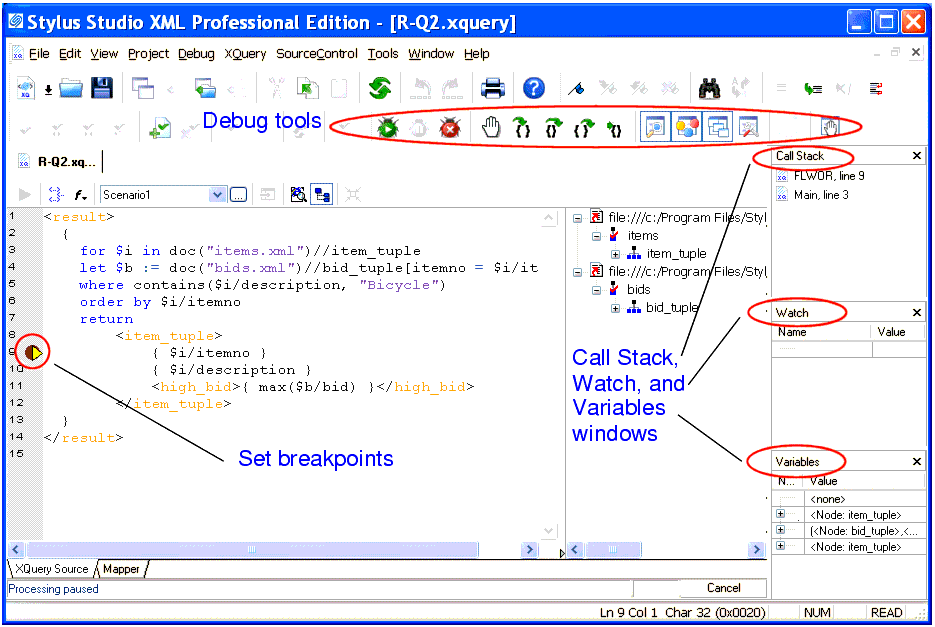
Figure 336. Debugging XQuery in Stylus Studio

With Stylus Studio, you can

  • Set breakpoints in your XQuery documents
  • Monitor the value of XQuery variables.
  • Trace the sequence of XQuery expressions that created output. With a click anywhere in the result, Stylus Studio Visual Backmapping technology displays the XQuery expression responsible for creating that result.
In this section

This section covers the following topics:

XML Schema Tutorial

An XML Schema Tutorial that explores real-world XML Schema development issues, XML Schema examples and various use cases.

Editing XSL Stylesheets

Learn how our powerful XSL stylesheet editor with built-in preview capabilities and synchronized visual and text-based stylesheet editors simplifies XSL and XSLT stylesheet development.

XQuery Editor

Stylus Studio's XQuery development tools are a tremendous help in building and testing XML applications requiring a standards-based approach to querying, integrating and transforming data from various distributed data sources.

Translating XML documents to X12

In-place, via XSLT and via XQuery are all mechanisms supported for converting XML to X12

Stylus Most Wanted

 
Free Stylus Studio XML Training:
W3C Member