Setting Values for External Variables

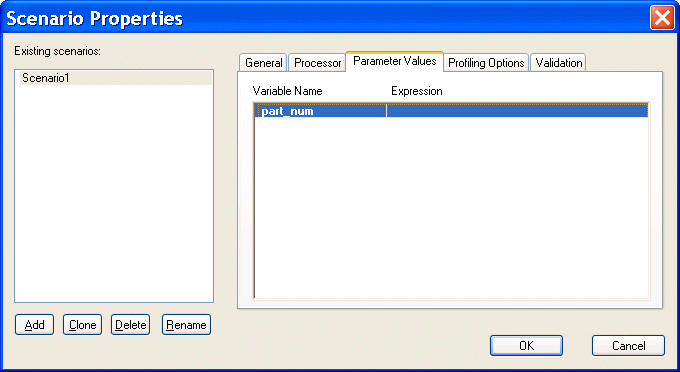
The Parameter Values tab of the Scenario Properties dialog box displays any external variables you have defined in the XQuery source. You can specify the parameter value you want to use for any external variables when you run the scenario. For example, imagine your XQuery code contains the following:

declare variable $part_num external


This variable is displayed on the Parameters tab as follows:

Figure 345. XQuery Scenario Parameters

When you run the scenario, you can specify the parameter value you want to use by double-clicking the Expression field and typing a value. Valid values are XPath expressions and must be entered using single or double quotes.

XSLT Mapper

Simplify XSLT mapping with the Stylus Studio XSLT Mapper - supports multiple data sources, round-trip engineering (synchronized editing views), XSLT function blocks, integrated XSLT preview and more.

Java XML Parser

Stylus Studio's support for Java XML Parser is able to Validate XML Using any Java XML Parser, Edit, Debug, Profile and Map XSLT using any Java XSLT Processor, Create PDF files Using Apache FOP, hand have Support for Microsoft XML Parsers as well.

Data Integration - DataDirect XML Converters

DataDirect XML Converters are high-performance Java components which provide bi-directional, programmatic access to virtually any data source as XML.

XML Helps Uncork Innovative Winery Web Sites

Learn how Freerun Technologies, Inc., a leading Internet services provider used Stylus Studio and XML technologies to develop a framework for Web-based eCommerce applications for the wine industry, reducing development cycles.

Stylus Most Wanted

Site Map | Privacy Policy | Terms of Use | Trademarks
Free Stylus Studio XML Training:
W3C Member
Stylus Studio® and DataDirect XQuery™are products from DataDirect Technologies, is a registered trademark of Progress Software Corporation, in the U.S. and other countries. © 2004-2007 All Rights Reserved.