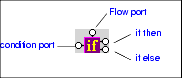
IF Blocks

IF blocks have a single input port, labeled condition; a Flow port; and two result ports: if then, and if else.

Figure 329. IF Block

You use IF blocks to compose if then, else XQuery expressions, such as the following:


              		<Book>
               

              			{
               

              				if( $book/title ) then
               

              					<Title/>
               

              				else
               

              					<ISBN/>
               

              			}
               

              		</Book>


This expression, for example, was composed by mapping

  • The title element in the source document to the IF block's input port.
  • The if then result port to the Title element in the target structure.
  • The if else result port to the ISBN element in the target structure.

IF blocks create a structure if the if then or if else branches are true. These ports can be connected to the target schema; otherwise they can be connected to Flow ports of FLWOR, function, and other IF blocks.

XML Schema Documentation Generator

Stylus Studio's XML Schema Editor includes an integrated XML Schema documentation generator, allowing you to easily publish XML content models defined in XML Schema in a convenient, HTML format. A screenshon of the XML Schema Editor is shown here.

Java Code Generation

The Stylus Studio Java Codce Generator lets you generate deployable Java code for XQuery and XSLT at the push of a button!

Property Management & Real Estate

Property Management & Real Estate

Validate XML Using XSD

You can validate XML documents against any data model defined using W3C XSD, using any major XSD Validator, including MSXML 3.0, MSXML 4.0, MSXML 6.0, Xerces-J, Xerces-C, Microsoft System.XML (1.0 and 2.0), XSV, the Saxonica XSD Validator and others.

Stylus Most Wanted

 
Free Stylus Studio XML Training:
W3C Member