|
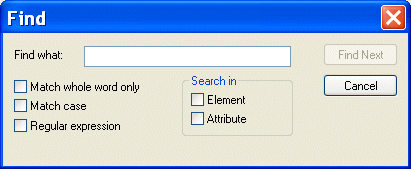
Home > Online Product Documentation > Table of Contents > Searching Document Panes Searching Document PanesYou can search document panes using the Find dialog box.
You can restrict your search to elements and/or attributes, and you can even search using regular expressions to define your match pattern. To display the Find dialog box:
1. Right-click in the document pane.
2. Select
Find from the shortcut menu.
|

Publishing & Printing
It is really hard to get things to look pretty, especially XML. That's why these publishing & printing companies use Stylus Studio to make a Mona Lisa out of data integration. Check out these top companies that are "stunning" with Stylus Studio!
Telecommunications Companies That Use Stylus Studio
Can you here me now? When it comes to telecommunications and XML it can get a little fuzzy. That's why these top telecommunication companies turn to Stylus Studio to connect them to their XML needs.
Key Benefits of DataDirect XML Converters
Learn how DataDirect XML Converters were created to maximize XML developer productivity, push innovation, and provide unquestioned value.
XQuery and Web Services
XQuery provides a flexible means for data abstraction, while Web services provide process abstraction. In this online video demonstration, learn how integrated XQuery & Web service tools simplify development of XQuery-based Web service applications.