
 Cart
Cart
Home > XML IDE - XML Editor > Screenshots > WSDL Design


WSDL Designer
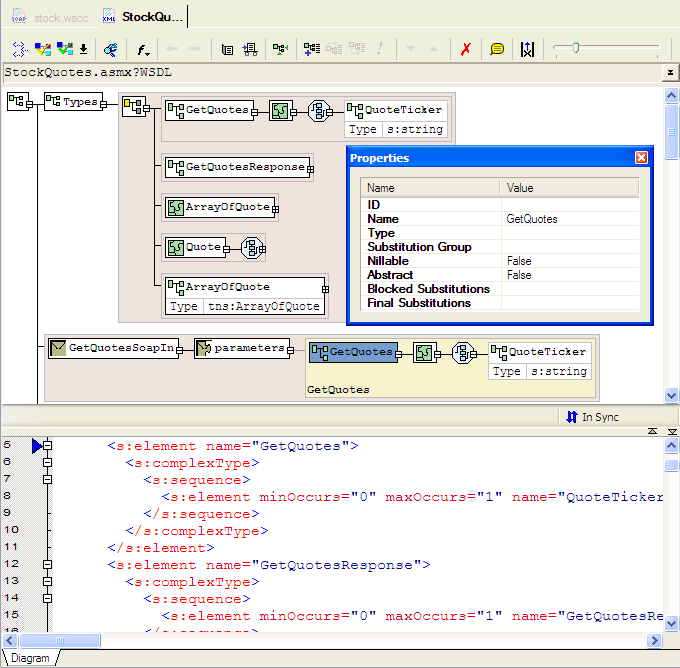
Stylus Studio®'s Web Services Description Language Designer, shown below, consists of a split-pane interface, with a graphical view of the WSDL at the top including:
- messages,
- portTypes,
- bindings,
- parts,
- operations, and
- embedded schemas.
The lower panel shows the text view of the WSDL, and it is live — editing either view instantly updates the other. You can right click anywhere in the WSDL Designer diagram, and add operations, bindings, and in an embedded schema elements and attributes, all from the context menu. The WSDL Designer is completely configurable, including what colors are selected, zoom levels, etc. Download a free trial of our award winning WSDL Designer today!
Related XML Schema Designer Features
- WSDL Editor
- Web Service Call Composer (Web Service Tester)
- XML Schema Editing Tools Overview
- Visual XML Schema Editor
More Stylus Studio Screenshots
- XML Development Environment
- Java Code Generator
- XML Diff Tool
- XML Grid Editor
- Converting to XML
- XML Mapper
- XSL Editor
- HTML-to-XML Importer
- XSL:FO Editor
- XSL Debugger
- XSLT WYSIWYG Designer
- XSLT Profiler (Optimize XSLT Stylesheets)
- XML Schema Designer
- XML Schema Mapper
- XML Schema Validator
- XML Schema Documentation Generator
- OASIS Catalog Support
- Database-to-XML Data Source Editor
- Document Type Definition Editor
- XQuery Mapper
- XQuery IDE
- XQuery Debugging
- XQuery Profiler (Optimize XQuery Expressions)
- Web Service Call Composer (SOAP Tester)
- Java IDE