The XML Publisher Canvas

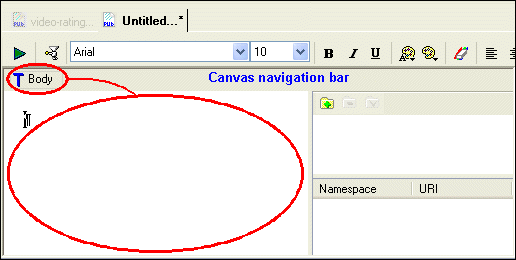
When you create an XML Publisher report, Stylus Studio starts the XML Publisher and displays a new report ( untitled.report). The canvas representing the report is empty, as shown here.

Figure 436. Empty Canvas in a New XML Publisher Report

The canvas represents the report's body, and all of the work you do when building a report - inserting XML data, tables, text and text blocks, and conditional expressions - takes place within the context of the body.

A useful way to think of the body is as the <body> tag in an HTML document - everything that you do on the report canvas would be described between the <body> and </body> tags in an HTML document. This metaphor is represented by the Body glyph ( ) in the canvas navigation bar at the top of the canvas - everything you subsequently add to the report canvas will be represented as a child of the report's body.

See How Data is Represented on the Canvas and More About the Navigation Bar for more information.

Visual Data Integration Using Stylus Studio XML Pipeline

XML Pipeline is a visual data integration tool for designing, editing, debugging and deploying XML applications. This tutorial covers building a data integration application that aggregates CSV and EDI data and publishes a report to HTML and PDF.

Using DTD in Java Applications

Learn how to validate XML documents using industry-standard DTD's from within your Java applications using Java DTD components including Apache Xerces and XSV.

Editing XSL Stylesheets

Learn how our powerful XSL stylesheet editor with built-in preview capabilities and synchronized visual and text-based stylesheet editors simplifies XSL and XSLT stylesheet development.

Using Stylus Studio with RenderX XEP

RenderX XEP is a production-quality engine that converts XSL:FO into PDF or PostScript files. You can use RenderX XEP in place of the Apache FOP engine to render PDF files from Stylus Studio.

Stylus Most Wanted

 
Free Stylus Studio XML Training:
W3C Member