Home >
Online Product Documentation >
Table of Contents >
How Data is Represented on the Canvas
How Data is Represented on the Canvas
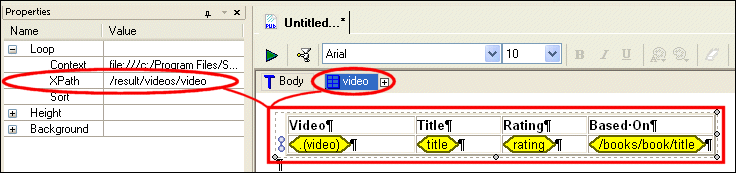
Data is represented by glyphs that contain an XPath expression. The composition of these XPath expressions varies based on the context of the component in which the data is being included. The glyph might contain just an element name, or it might display a longer XPath expression if it represents data whose context is not established by the containing component.
Example
The context for the table component shown in
Figure 458 is the
video repeating element from the
videos.xml document. You can see this if you select the table in the canvas and look at either the
- The Context and XPath sub-properties for the repeating row
- The
Video table glyph in the navigation bar
|
|
Figure 458. Value Glyphs on the XML Publisher Canvas
|
Tip
|
|
You can see the context for any piece of data or component by hovering the mouse pointer over it. When you do, Stylus Studio displays a tooltip that includes the URL and XPath.
|
The following table shows the different types of XPath expressions you might see in an XML Publisher report.
|
Data Glyph
|
Contains
|
Description
|
|
|
The current context
|
The XPath expression for context is a dot. To make this easier to see in the glyph, Stylus Studio adds the element name in parentheses following the dot.
|
|
|
An element (or attribute) name
|
If the context is established by the containing component, the data glyph contains only the element or attribute name.
|
|
|
A full XPath
|
If the context for the data is not established by the containing component, Stylus Studio displays the full XPath needed to resolve it.
|
Table 159. Explanation of XPath Expressions in Data Glyphs
 Cart
Cart