|
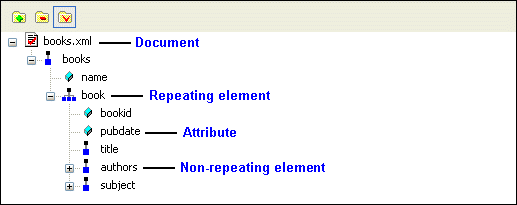
Home > Online Product Documentation > Table of Contents > Example: Dropping a Repeating Node Example: Dropping a Repeating NodeAs described earlier, the data source - whether it is an XML document, a relational database table, an EDI file converted to XML, or some other XML data source - is represented as a data model in the data sources panel. The glyphs used for the nodes are based on the object they represent in the data source, as shown here.
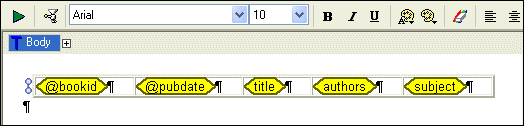
For this example, we use
The following table summarizes the types of components you can create and automatically populate with data based on the node type.
See Working with Report Components for information about specific components. |

XML Editing Views
Stylus Studio includes three synchronized XML editing views: Text View, Tree View, and Grid View, allowing you to work with and edit XML documents in whatever way suits you best.
Berkeley DB XML and Stylus Studio
Develop XML applications for Berkeley DBXML with Stylus Studio integrated tools support for SleepyCat Software's DBXML. Open, Query and Save XML to and from Berkeley DB XML directly from within the Stylus Studio XML IDE.
Create XML Views of Relational Data Using DataDirect XQuery
DataDirect XQuery simplifies creating, querying and updating of relational databases as XML including Microsoft SQL Server, Oracle, IBM DB2, Sybase and Informix.
Telecommunications Companies That Use Stylus Studio
Can you here me now? When it comes to telecommunications and XML it can get a little fuzzy. That's why these top telecommunication companies turn to Stylus Studio to connect them to their XML needs.