|
Home > Online Product Documentation > Table of Contents > Using the Grid Tab Using the Grid Tab
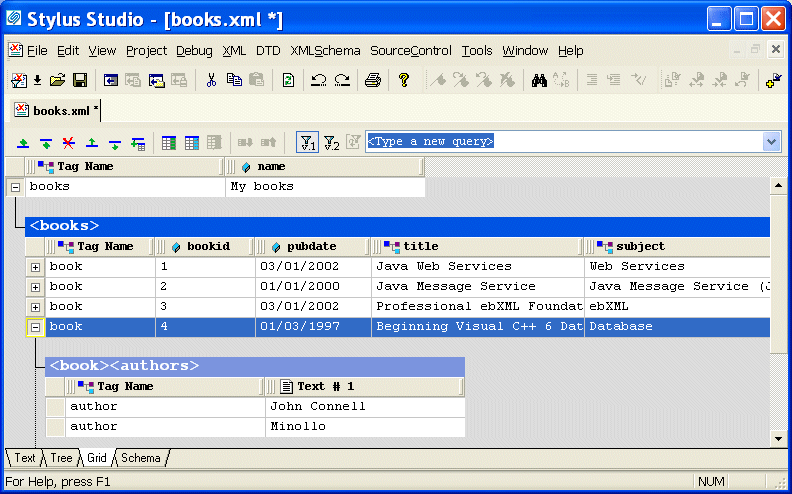
The Grid view of an XML document is useful for structured data - it is a convenient way to view and work with documents that contain multiple instances of the same type of element.
This section describes the features of the Grid tab and how to use it to edit XML documents. This section covers the following topics:
A complete list of the videos demonstrating Stylus Studio's features is here: http://www.stylusstudio.com/xml_videos.html. |

XML Editor
Stylus Studio XML editor includes many XML editing utilities and features to simplify XML development, including intuitive XML editing views, integrated XML validation and troubleshooting utilities, XML formatting tools, XML generation tools, etc.
XQuery Talk
Join the XQuery Talk mailing list for a practical discussion about XQuery. It's a place to work together to learn a new language, talk about problem solutions, discuss engines and implementations, chat about the latest XQuery news and more.
Web Service Data-to-XML Mapper
Stylus Studio provides a powerful standards-based solution for accessing and transforming live Web service XML data. Intuitive tools like the Web Service Call Composer and UDDI Browser make developing Web service applications a snap.
Validate XML Using XSD
You can validate XML documents against any data model defined using W3C XSD, using any major XSD Validator, including MSXML 3.0, MSXML 4.0, MSXML 6.0, Xerces-J, Xerces-C, Microsoft System.XML (1.0 and 2.0), XSV, the Saxonica XSD Validator and others.