How Grid Changes Affect the XML Document

When you make a change to the document structure or content on the Grid tab, those changes are reflected immediately in the underlying XML document. You can see your changes affect the document on the Text tab.

Consider the following excerpt from books.xml.

<authors>
               
	<author>David A. Chappel</author>
               
	<author>Tyler Jewell</author>
               
</authors>


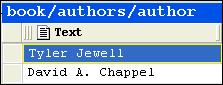
If you move the rows in the authors table, for example, as shown in Figure 121,

Figure 121. Moving a Row Affects XML

the underlying XML changes accordingly:

<authors>
               
	<author>Tyler Jewell</author>
               
	<author>David A. Chappel</author>
               
</authors>


Types of Changes that Affect the Document

The following changes, all of which can be made using Grid tab, affect the underlying XML document:

  • Adding, deleting, reordering rows
  • Adding, deleting, reordering, and renaming columns
  • Adding, deleting, reordering, and sorting tables
  • Changing element and attribute values
  • Renaming container elements

Changes you make affect the current instance only. For example, in the example shown in Figure 121, only that instance of the nested table is affected. If you add a column to books/book, however, every instance of books/book gets that new column.

Using DataDirect XML Converters

Learn how to use DataDirect XML Converters and the Stylus Studio Java Code Generator to deploy the XQuery applications you build in Stylus Studio to a live server environment.

Data Integration Tools: Using the Stylus Studio XML Pipeline to Visually Integrate and Publish Data

Data Integration Tools from Stylus Studio include a visual pipeline editor, support for non-XML data sources, scalable data integration components, cross-language debugging and Java code generation. Try it now.

Validating X12 Documents with XML Schemas

Either before or after transforming X12 EDI content, generated XML Schemas will make sure that we have all of the necessary components, our codes are all according to the standard codelists, and every little delimiter is in the right place.

XQuery Functions - User Defined Functions in XQuery

Dr. Michael Kay's tutorial entitled: 'Defining your own Functions in XQuery' explains how to write powerful User Defined Functions in XQuery.

Stylus Most Wanted

 
Free Stylus Studio XML Training:
W3C Member