Using the Text Editor

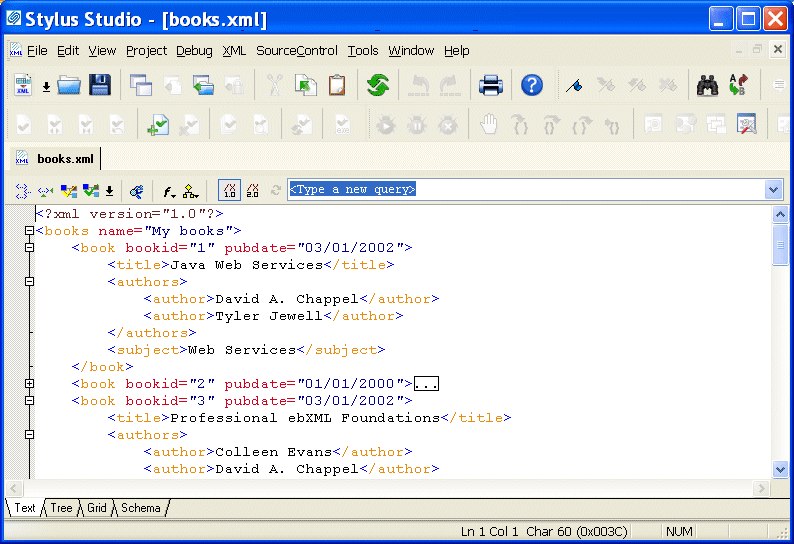
You use the Text tab of the XML editor to edit XML text. The Text tab provides the usual tools you expect to find in a text editor. These tools are described in this section.

Figure 103. Text Tab in the XML Editor

This section covers the following topics:

DTD Validator

This page talks about Stylus Studio's DTD Validator it has the ability to specify any third-party XML parsers and validators, real-time syntax checking and DTD validation error reporting, backmapping, integrating third-party DTD validators and more!

Convert DTD to XML

Learn how to create a sample XML instance document from a DTD using Stylus Studio DTD to XML conversion tools.

Switch to Stylus Studio: Customer Testimonials

Read in their own words, why customers have decided to make the switch to Stylus Studio, the World's best XML editor.

Convert DTD to XSD

learn how to convert DTD to XML Schema

Stylus Most Wanted

Site Map | Privacy Policy | Terms of Use | Trademarks
Free Stylus Studio XML Training:
W3C Member
Stylus Studio® and DataDirect XQuery™are products from DataDirect Technologies, is a registered trademark of Progress Software Corporation, in the U.S. and other countries. © 2004-2007 All Rights Reserved.