Using the Server URL Field

You use the Server URL field to identify the server hosting the database to which you want to connect, the port to use, and any other required or optional parameters. For example, the string used to connect to a Microsoft SQL Server database might look like this:
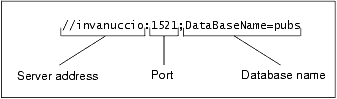
The specific syntax of the string you enter in the Server URL field varies based on database type. Consult your database documentation for information regarding connectivity syntax and optional parameters.

Tip


Stylus Studio populates the Server URL field with a default string appropriate for the database you specify in the Type field.

Getting EDI to XML and back to EDI Again: Round Trip Engineering using Stylus Studio URL Adapters

A free online video demonstration shows how to use Stylus Studio's Adapter URL technologies to convert EDI to XML and back again. Convert, validate, view and edit EDIFACT data directly in Stylus Studio.

HTML to XML Importer

Convert HTML to XML with the Stylus Studio HTML to XML Importer, a powerful, visual utility for Converting HTML to XML with ease.

MSXML - Microsoft XML Tools

MSXML tools in Stylus Studio feature integrated XML validation, XSLT transformation and XSLT debugging using the Microsoft's COM-based XML processing components: MSXML 3.0, MSXML 4.0 and MSXML 6.0

XML Unicode Encoding

Stylus Studio supports over 300 different file encodings, including UTF-8, UTF-16, EUC-JP, SHIFT-JIS, and more, alowing you to work with any XML document. Robust text editors support standard editing features, and Sense:X intelligent auto-completion.

Stylus Most Wanted

 
Free Stylus Studio XML Training:
W3C Member
