XML Parser Nodes

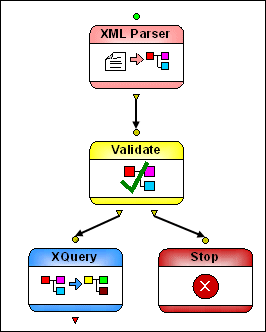
XML Parser nodes convert text input to an XML document.

Figure 429. Example XML Parser Node Implementation

Input Port

XML Parser nodes have a single input port that you use to specify the text to be converted to XML. You can specify a default value, or the value can be dynamic (the output from another node in the XML pipeline, for example).

Output Ports

XML Parser nodes have a single output port, used to specify what to do with the result of the transformation. You can

  • Use the Copy to URL property to write the output to a file system
  • Pipe the output to another node (like Validate, for example)
  • Or both

An output must be specified in order for the node to be processed.

XML Code Folding

Stylus Studio's XML Editor features XML code folding, a powerful and intuitive way to maximize limited screen real-estate and help make sense of large XML files.

XML Unicode Encoding

Stylus Studio supports over 300 different file encodings, including UTF-8, UTF-16, EUC-JP, SHIFT-JIS, and more, alowing you to work with any XML document. Robust text editors support standard editing features, and Sense:X intelligent auto-completion.

Stylesheet Design - How to Publish your Data Using a Stylesheet Designer

Simplify Stylesheet Design with Stylus Studio's XML Publisher, a visual stylesheet designer and code generator to help you create XSLT or XQuery to publish your data to HTML+CSS or XSL:FO.

XML Grid View

The XML Grid View is a visual interface for editing tablular data structures using an intuitive spreadsheet-like interface.

Stylus Most Wanted

 
Free Stylus Studio XML Training:
W3C Member