Cart
Cart
|
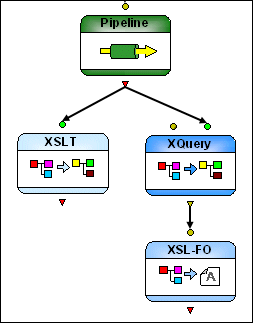
Home > Online Product Documentation > Table of Contents > XQuery and XSLT Nodes XQuery and XSLT NodesXQuery and XSLT nodes represent XQuery and XSLT documents. XQuery and XSLT code is executed using the processors specified in the XML pipeline's execution framework. See Specifying an Execution Framework for more information on this topic.
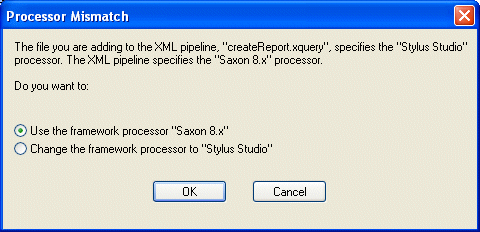
Input PortsXQuery and XSLT nodes have a single input port by default which you use to specify the XML input to be transformed. You can specify a default value, or the value can be dynamic (the output from another node in the XML pipeline, for example). Additional input ports, like the one on the XQuery node in Figure 417, appear if Output PortsXQuery and XSLT nodes have a single output port, used to specify what to do with the result of the transformation. You can Scenario PropertiesAn XQuery or XSLT document's default scenario properties are reflected in the XML pipeline only if you drop the document directly on the canvas. For example, if the default scenario for your XQuery document specifies RenderX post-processing, Stylus Studio automatically adds an XSL-FO node to the XML pipeline, connected to the XQuery node's output port when you drop it on the canvas to represent the post-processing. If you drop the document on an existing XQuery node, however, the XSL-FO post-processing node is not added to the XML pipeline. Scenario properties treated in this way include Similarly, changes made to default scenario properties are not reflected in the XML pipeline unless you re-add the document to the XML pipeline by dropping it on the canvas. Changes to Source CodeWhen you save changes to the source XQuery or XSLT documents used in an XML pipeline, those changes are reflected the next time the XML pipeline is executed. If you added external variables or parameters, new input ports are added to the XQuery and XSLT nodes. Managing Processor ConflictsEach XQuery and XSLT document is associated with its own set of processors, which are specified on the Processor, Post-Process, and Validation tabs of XQuery and XSLT Scenario Properties dialog boxes. When you add an XQuery or XSLT node to an XML pipeline by dragging and dropping the document onto the XML pipeline canvas, Stylus Studio displays the Processor Mismatch dialog box if the document's processor settings differ from those specified for the XML pipeline.
You can
|

XML PRODUCTIVITY THROUGH INNOVATION ™