
 Cart
Cart
Home > XML IDE - XML Editor > Screenshots > Stylus Studio XML Mapper Screenshot


Stylus Studio® XML Mapper Screenshot
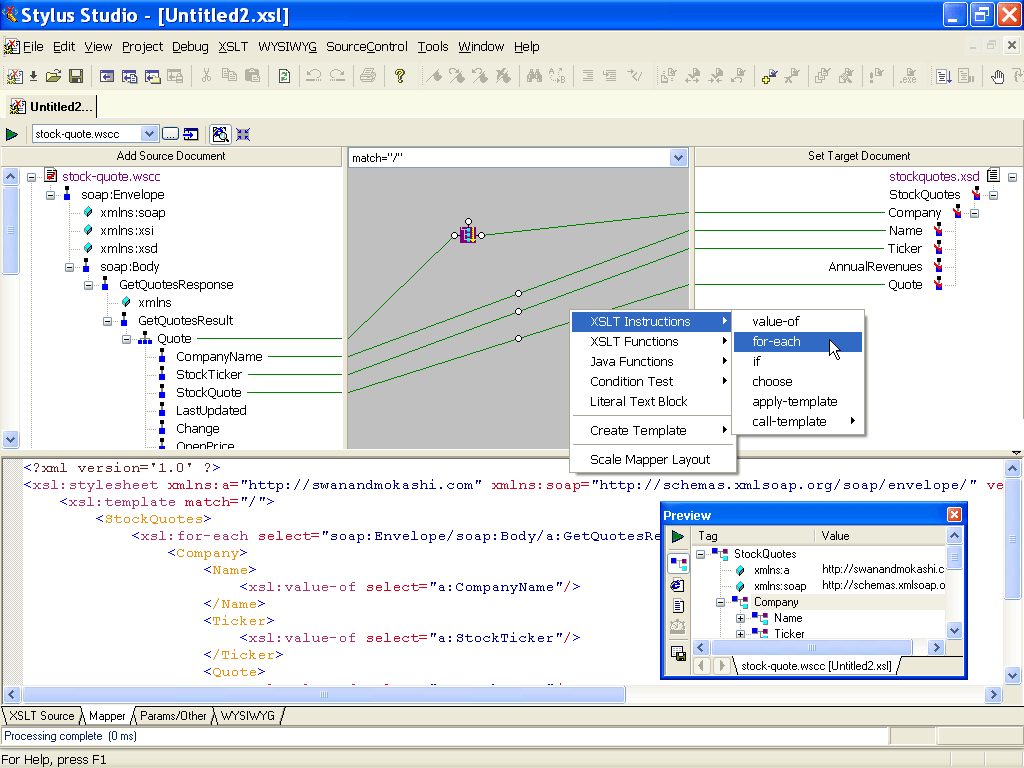
Stylus Studio® includes powerful XML Mapper (illustrated below) designed to simplify XML data integration projects by providing visual XML mapping tools which operate on standard XSLT or XQuery files. The XML mapping window is located to the right of the Project Menu, and consists of 3 windows: An XML Source Document(s) Window (on the left), the Mapping Window (in the middle), and the Target Document Window (on the right side). To use the XML Mapper simply load one or more XML "sources", which could include XML instance documents, DTD's, XML Schemas, and even relational databases or Web service data. Next, you can optionally specify a target document (or, you can define the target document on the fly). Start data mapping by dragging and dropping data nodes from the Source Window to the Target Window. Our XML Mapper supports data processing, looping and flow-control (eg: xsl:for-each, xsl:if, xsl:choose, XQuery FLWOR expressions, etc), and all other XQuery and XSLT language constructs, represented by various blocks with inputs and outputs on the mapping diagram.
Our XML Mapper operates on standards-based XQuery and XSLT files, providing an intuitive, synchronized split-pane editing environment for developing XML mappings. In the illustration below, the top pane displays a visual XML mapping model and the bottom pane displays the underlying source code, in this case, an XSLT stylesheet. As you visually connect XML data components via the drag-and-drop visual editing pane, the source code is automatically synchronized to reflect your visual editing operations. Similarly, you can manually type in the source code pane and edit either the XSLT or XQuery code, which will result in an automatic synchronization of the visual XML mapping model.
More Stylus Studio Screenshots
- XML Development Environment
- Java Code Generator
- XML Diff Tool
- XML Grid Editor
- Converting to XML
- XML Mapper
- XSL Editor
- HTML-to-XML Importer
- XSL:FO Editor
- XSL Debugger
- XSLT WYSIWYG Designer
- XSLT Profiler (Optimize XSLT Stylesheets)
- XML Schema Designer
- XML Schema Mapper
- XML Schema Validator
- XML Schema Documentation Generator
- OASIS Catalog Support
- Database-to-XML Data Source Editor
- Document Type Definition Editor
- XQuery Mapper
- XQuery IDE
- XQuery Debugging
- XQuery Profiler (Optimize XQuery Expressions)
- Web Service Call Composer (SOAP Tester)
- Java IDE