Learn WSDL: WSDL Video Demonstration

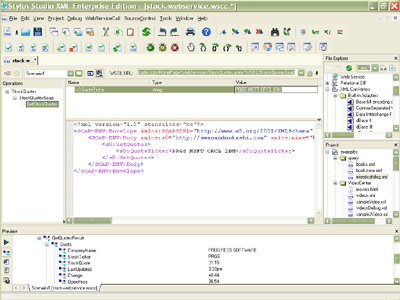
Learn WSDL easily with Stylus Studio®'s intuitive Web Service Call Composer. See how you can use Stylus Studio to visually search UDDI registries, locate WSDL files, invoke Web service methods and then save the Web service call for use in XML data mapping projects. This video demonstration shows you how to use Stylus Studio®'s Web Service call composer to locate a WSDL file on the Internet, inspect, create SOAP envelope, invoke and inspect Web service data.

Enlarge Web Service Call Composer Screenshot (click to enlarge)

Using the Web Services Call Composer Covers:


  • Using Stylus Studio® to Compose a Web Service Call
  • Examining Web Service Description Language (WSDL) files in Stylus Studio®'s WSDL Editor
  • Visually analyzing available methods described in a WSDL file, as well as parameters (function arguments) and parameter types
  • Using Stylus Studio® to search public UDDI registries (such as XMethods, Microsoft, IBM, etc.) for Web Services to locating and load a Web Service's WSDL file
  • Querying and navigating a UDDI registry with Stylus Studio®'s UDDI registry navigator to find a stock quote Web service
  • Selecting a WSDL's URL and inspecting the its available operations and function prototypes
  • Examining the SOAP envelope used to invoke the Web Service method
  • Populating the SOAP envelope with Web service parameters and invoking the Web Service Method
  • Viewing the results returned by a Web Service call in the Preview Window
  • Saving the Web Service call, including information about the Web Service that was invoked and the parameters that were sent
  • Publishing the live Web service call's data using the XML-to-HTML stylesheet designer
  • Configuring the XML-to-HTML stylesheet designer to work with live Web service data
  • Developing the XSLT stylesheet visually using the XSLT diagram view, or manually using the XSLT editor, in an intuitive, synchronized way
  • Inspecting the XML content model of the live Web service call data
  • Visually building a dynamic HTML table and previewing the HTML output in the Output Window

XML Code Folding

Stylus Studio's XML Editor features XML code folding, a powerful and intuitive way to maximize limited screen real-estate and help make sense of large XML files.

XML Schema Validator, DTD Validator

Stylus Studio lets you validate XML documents using integrated XML Schema or DTD validators. Use the Stylus Studio built-in validator, or any number of supported XML parsers and XML validators like MSXML SAX and DOM, Xerces, .NET, and more!

XPath Query Editor

Stylus Studio's XML Editor has an XPath Query Editor that allows you to easily roubleshoot, test, and debug any XPath expression.

XHTML Tools

Powerful XHTML Tools for converting HTML to XHTML, validating XHTML, transforming XML to XHTML, editing JSP, creating XML driven Websites and more.

Stylus Most Wanted

PURCHASE STYLUS STUDIO ONLINE TODAY!!

Purchasing Stylus Studio from our online shop is Easy, Secure and Value Priced!

Buy Stylus Studio Now

Learn WSDL with Stylus Studio Web Services Tools

Download a free trial or our award-winning web services tools and learn how to use WSDL today!

Learn Stylus Studio in 6 Minutes

Can six minutes change your life? A new action-packed online video demonstration covers how to use Stylus Studio in just six minutes! Watch this video and change the way you develop XML applications forever!

Ask Someone You Know

Does your company use Stylus Studio? Do your competitors? Engineers from over 100,000 leading companies use Stylus Studio, and now you can ask someone from your own organization about their experiences using Stylus Studio.

XML Data Sheets

Stylus Studio® 6 XML Integrated Development Environment pdf >

 
Free Stylus Studio XML Training:
W3C Member