|
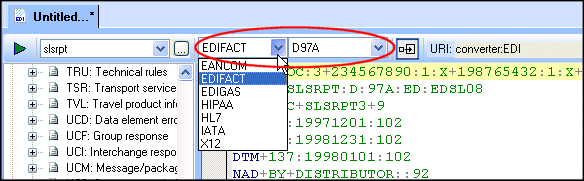
Home >Online Product Documentation >Table of Contents >Correcting Dialect and Version Errors Correcting Dialect and Version ErrorsTo correct a dialect or version error, right-click the line with the red or yellow background in the EDI document pane and choose the appropriate fix from the shortcut menu: Stylus Studio changes the value in the Select Dialect or Select Version fields at the top of the EDI to XML editor and the red or yellow background is cleared. Note that you can change the dialect and version manually any time you need using the drop-down lists: |

Building Workflow Applications with XML
Learn how to design custom XML workflow applications - from modeling your data and information processes, to capturing input from users in XML, and finally, generating useful queries and reports from the XML data -- using XSLT & XQuery technologies.
Convert DTD to XML
Learn how to create a sample XML instance document from a DTD using Stylus Studio DTD to XML conversion tools.
Open XSLT Architecture
Learn how Stylus Studio's Open XSLT Architecture enables you to use any of the popular industry-standard XSLT processors (like Saxon, Xalan-J, MSXML, Microsoft .NET, and others) for all your XSLT development tasks.
Insurance Companies That Use Stylus Studio
Everyone needs insurance, even insurance companies. That's why these top insurance companies are insured when it comes to XML. Come see which insurance providers are insured by the power of Stylus Studio!