IF Blocks

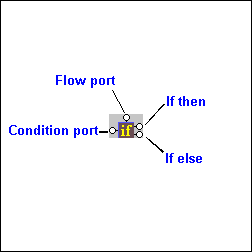
IF blocks have a single input port, labeled condition; a Flow port; and two result ports: if then, and if else.

Figure 317. IF Block

You use IF blocks to compose if then, else XQuery expressions, such as the following:


              		<Book>
               

              			{
               

              				if( $book/title ) then
               

              					<Title/>
               

              				else
               

              					<ISBN/>
               

              			}
               

              		</Book>


This expression, for example, was composed by mapping

  • The title element in the source document to the IF block's input port.
  • The if then result port to the Title element in the target structure.
  • The if else result port to the ISBN element in the target structure.

IF blocks create a structure if the if then or if else branches are true. These ports can be connected to the target schema; otherwise they can be connected to Flow ports of FLWOR, function, and other IF blocks.

Web Service Servers

Stylus Studio's Web Services tools support development and testing of Web service applications on the industry's leading Web Service Servers including Apache AXIS, Mirosoft SOAP Client Toolkit and Microsoft .NET Server.

XML-DEV Blog

Join the XML Development discussion at XML-Dev - the hottest place to talk about XML technologies, trends, systems architecture and all the latest buzz. Bookmark this RSS and ATOM feed now!

DTD vs. Schema

Stylus Studio provides tools for working with both W3C XML Schema and DTD's - this tutorial explains what the differences are between the two, providing a technical comparison of DTD vs Schema.

XML Project

Stylus Studio's Project Window is an intuitive, visual feature for organizing files belonging to a project. It supports different file-type icons and nested folders; many helpful options are available from the context menu.

Stylus Most Wanted

 
Free Stylus Studio XML Training:
W3C Member