|
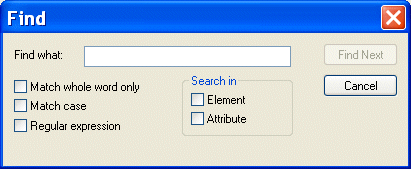
Home > Online Product Documentation > Table of Contents > Searching Document Panes Searching Document PanesYou can search document panes using the Find dialog box.
You can restrict your search to elements and/or attributes, and you can even search using regular expressions to define your match pattern. To display the Find dialog box:
1. Right-click in the document pane.
2. Select
Find from the shortcut menu.
|

Getting EDI to XML and back to EDI Again: Round Trip Engineering using Stylus Studio URL Adapters
A free online video demonstration shows how to use Stylus Studio's Adapter URL technologies to convert EDI to XML and back again. Convert, validate, view and edit EDIFACT data directly in Stylus Studio.
SQL/XML Tutorial
Many developers need to be able to write applications that work for databases from multiple vendors. This SQL/XML Tutorial refers to SQL/XML, XQuery, and Native XML Programming Languages to do just that.
XML Schema Validator, DTD Validator
Stylus Studio lets you validate XML documents using integrated XML Schema or DTD validators. Use the Stylus Studio built-in validator, or any number of supported XML parsers and XML validators like MSXML SAX and DOM, Xerces, .NET, and more!
The XML Primer: Editing and Validating XML in Stylus Studio
The XML primer demonstrates editing and validating XML in Stylus Studio demonstrates XML editing tools and utilities to simplify working with XML documents. Learn how to automate XML editing operations and troubleshoot XML documents today!