How to Run a Scenario

To run a scenario:
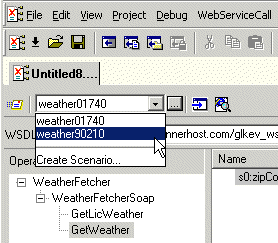
1. Select a scenario from the scenario drop-down list at the top of the editor window:

Figure 374. Picking a Saved Scenario

Alternative:

a. In the Web Service Call Composer tool bar, click .

Stylus Studio displays the Scenario Properties dialog box.

b. On the General tab, select the scenario you want to run from the Existing preview scenarios list.
c. Click OK.
2. Click the Send Request button ( ) .

Learn XSLT

Free online video demonstrations for learning XSLT and how to design XSLT stylesheets to convert XML to HTML in publishing applications, or how to convert HTML to XML.

XML Box Office Blockbusters

Browse a list of the season's biggest block-buster XML video demonstrations, now playing at the Stylus Studio movie theater - Free Admission!

Internet & eBusiness

Internet & eBusiness

XML Validator

Stylus Studio has a built-in XML validator that supports industry-standard DTD and XML Schema validators including MSXML 4.0 SAX, MSXML 4.0 DOM, Microsoft .NET XML Parser (System.XML), Xerces-J 2.5.1, XSV 2.6, etc. Validate XML with Stylus Studio.

Stylus Most Wanted

 
Free Stylus Studio XML Training:
W3C Member