How to Create a Scenario

To create a scenario:
1. Create a Web service call if you haven't already. See How to Compose a Web Service Call if you need help with this step.
2. Display the Scenario Properties dialog box by clicking in the Web service editor tool bar.

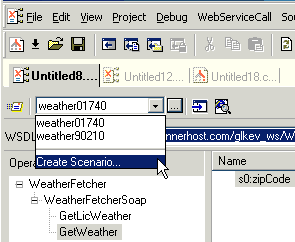
Alternative: Select Create Scenario from the scenario drop-down list at the top of the editor window:

Figure 373. Creating a Scenario

3. On the General tab, specify a name for the Web service call scenario.
4. Click the Binding tab.
5. Select the appropriate transport protocol from the Transport drop-down list.
6. Specify the binding properties you want to associate with this Web service call scenario.
7. Click OK.

The Web service call scenario is saved with the name and settings you specified.

Writing Custom XML Adapters

There are cases where the input format is too complicated for Convert to XML, or both reading and writing of the file format is needed. This section will take you through the process of writing a medium-sized adapter in Java.

XPath Introduction - Using XPath Queries to Extract Data from XML Documents

The XPath introduction covers how to use XPath code completion, XPath syntax highlighting, support for XPath 2.0 functions and XML namespaces to simplify your next XPath application.

Apache XML Project

The Apache XML Project provides standards-based, open-source XML solutions for working with W3C XML technologies including XML, XSL, XSLT, XSL:FO XPath, Web services and more. Learn how Stylus Studio provides support for all Apache XML projects.

Create XML Views of Relational Data Using DataDirect XQuery

DataDirect XQuery simplifies creating, querying and updating of relational databases as XML including Microsoft SQL Server, Oracle, IBM DB2, Sybase and Informix.

Stylus Most Wanted

 
Free Stylus Studio XML Training:
W3C Member