Overview of Scenario Features

This section describes the main features of Web service call scenarios. It covers the following topics:

Scenario Names

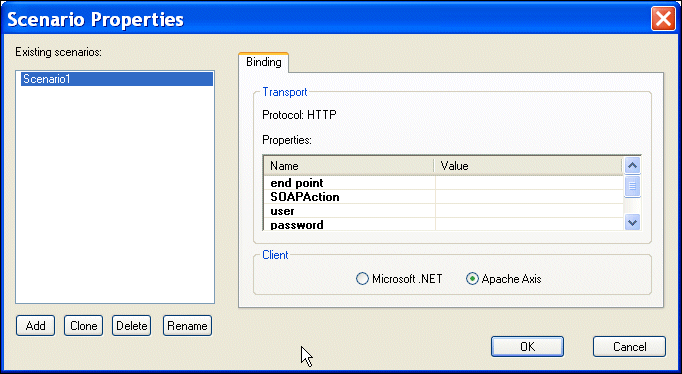
You specify a name for a Web service call scenario on the Binding tab of the Scenario Properties dialog box.

Figure 372. Binding Tab of the Web Service Call Scenario Properties Dialog Box

When you create a Web service call scenario, specify a name that makes it easy to distinguish one scenario from another.

Transport Protocol and Client Settings

You specify the transport protocol you want to use when testing the Web service on the Binding tab of the Scenario Properties dialog box.

When you use HTTP as the transport protocol, the Web service call client can be any one of the following:

  • Microsoft .NET
  • Apache Axis

Other Transport Setttings

Once you specify the client, Stylus Studio displays a list of additional settings that you can use to define properties for the scenario. Some values, such as the time out, are system defaults. Others, such as the SOAP action, are taken directly from the WSDL specified in the Web Service Call Composer.

Note


Values you specify on the Binding tab override those in the WSDL displayed in the Web Service Call Composer.

HTTP Settings

The following table describes the scenario settings associated with the HTTP transport protocol.

Setting
Description
end point
The server on which the Web service is executed. For example: http://glkev.webs.innerhost.com/glkev_ws/WeatherFetcher.asmx.
This value is taken from the current Web service call. Required.
SOAPAction
The SOAP action described by the WSDL you selected for the Web service call. For example: http://www.myasptools.com/GetWeather
This value is taken from the current Web service call. Required.
user
The username used to access the Web service if authentication is required. Optional.
password
The password used to access the Web service if authentication is required. Optional.
time out
The time in milliseconds until the connection to the Web service server is dropped due to inactivity. The default is 300000 (300 seconds). Required.
Table 99. HTTP Settings

XML Schema Library

The Stylus Studio XML Schema Library provides a detailed reference of many of the world's most commonly used XML vocabularies in an easy-to-read format.

Stylus Studio Blogs

Blogging is the hottest fad on the Internet and Stylus Studio has jumped on the bandwagon. Bookmark these XML Blogs to keep up with all the latest XML buzz in the internet blogosphere. Includes RSS and Atom Feeds!

Validate XML Using XSD

You can validate XML documents against any data model defined using W3C XSD, using any major XSD Validator, including MSXML 3.0, MSXML 4.0, MSXML 6.0, Xerces-J, Xerces-C, Microsoft System.XML (1.0 and 2.0), XSV, the Saxonica XSD Validator and others.

XSLT Mapper

Simplify XSLT mapping with the Stylus Studio XSLT Mapper - supports multiple data sources, round-trip engineering (synchronized editing views), XSLT function blocks, integrated XSLT preview and more.

Stylus Most Wanted

Site Map | Privacy Policy | Terms of Use | Trademarks
Free Stylus Studio XML Training:
W3C Member
Stylus Studio® and DataDirect XQuery™are products from DataDirect Technologies, is a registered trademark of Progress Software Corporation, in the U.S. and other countries. © 2004-2007 All Rights Reserved.