Modifying a SOAP Request

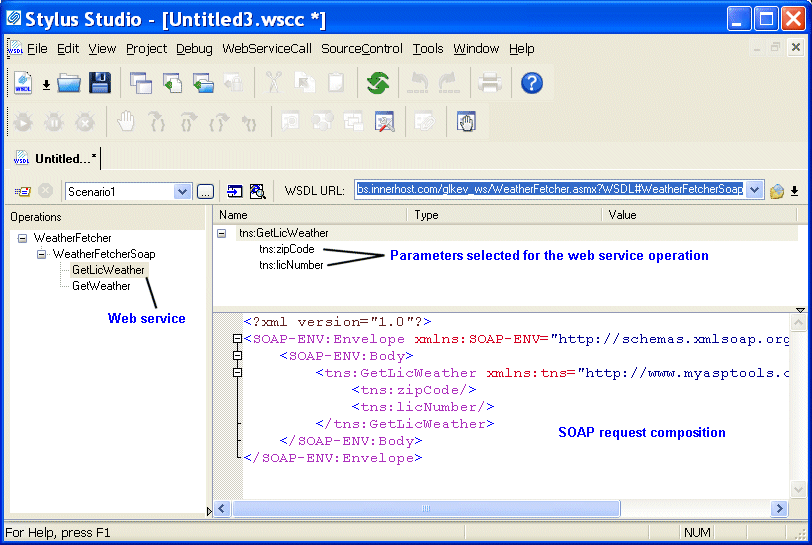
When you select a WSDL from the Result field in the UDDI Browser and click OK, the operations exposed by the Web service are displayed in the Stylus Studio Web Service Call Composer.

Figure 368. Modifying a SOAP request

When you select an operation from the Operations pane, Stylus Studio displays

  • Parameters associated with that operation, including their datatype and a field in which you can enter a value for testing purposes.
  • The XML that describes the SOAP request associated with that operation. You can edit the SOAP request, but for initial testing you should restrict changes to providing parameter values, and you can use the parameter's Value field for this purpose.

Biotechnology & Pharmaceuticals

Leading biotechnology & pharmaceuticals companies take Stylus Studio when they are feeling under the weather. Come see for yourself how Stylus Studio can be a pick me up for your biotechnology or pharmaceutical company.

Forest & Paper Products

Many forest & paper product companies realize the best XML suite doesn't have "pay per" features. That's why these top forest & paper product companies choose Stylus Studio 2006 to get the world's best XML features all in one bundle!

XML Operations

Using XML Pipeline it's easy to visually specify a series of XML operations to apply on your XML data, including parsing, validating, converting and transforming, according to the needs of your business application.

Converting Static HTML to XML

This video tutorial covers how to convert static HTML to XML.

Stylus Most Wanted

Site Map | Privacy Policy | Terms of Use | Trademarks
Free Stylus Studio XML Training:
W3C Member
Stylus Studio® and DataDirect XQuery™are products from DataDirect Technologies, is a registered trademark of Progress Software Corporation, in the U.S. and other countries. © 2004-2007 All Rights Reserved.