Cart
Cart|
Home > Online Product Documentation > Table of Contents > Simple Table Formatting Simple Table FormattingIn this section, we will perform some simple formatting to make the table more presentable. We will start by making the column headings, Title and Rating, bold.
16. First, click the
Show Text Symbols button (
 ) in the toolbar.
This removes text symbols (like spaces and paragraph markers) from the canvas, which can make the canvas easier to work with while you build the report.
17. Click anywhere in the cell containing the
Title string.
18. Click the
Bold tool on the toolbar (
 ).
).
The Title string appears bold in the canvas.
19. Make the
Rating string bold.
Next, we want to adjust the width of the first column, so the ratings appear closer to the title.
20. Click either of the rows in the table's first column.
21. Click the
Column tab in the
Properties window. (If the
Properties window is not displayed, select
View > Properties from the Stylus Studio menu.)
22. Enter 40% for the
Width property.
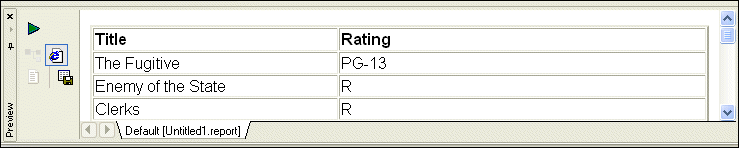
23. Click
Preview (
 ).
).
The Preview window displays the changes.
|

XML PRODUCTIVITY THROUGH INNOVATION ™