|
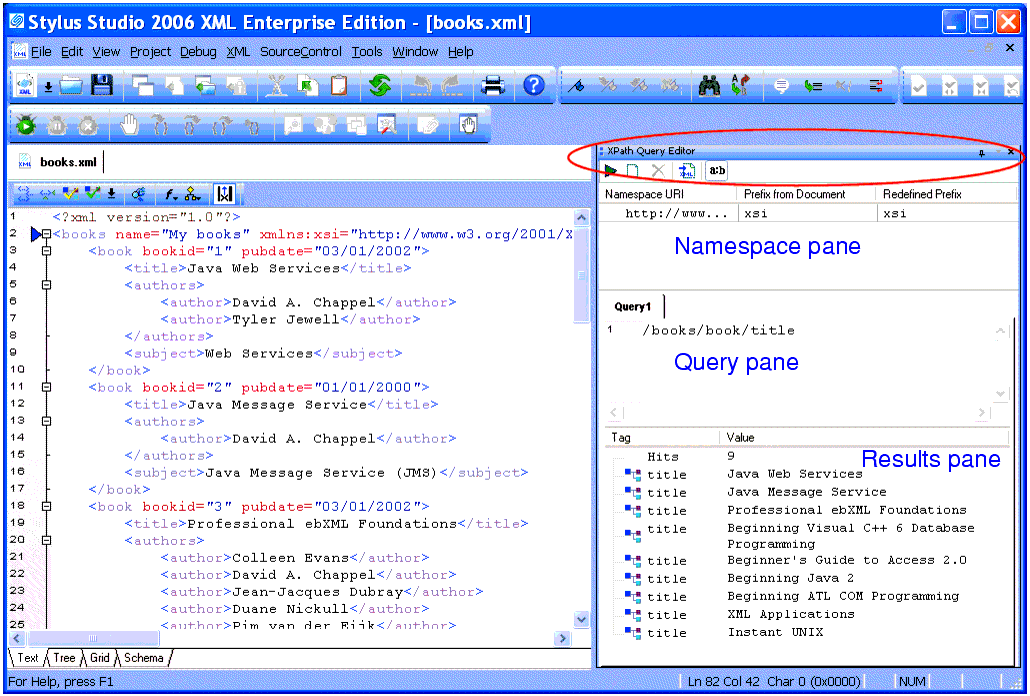
Home > Online Product Documentation > Table of Contents > Using the XPath Query Editor Using the XPath Query EditorThe XPath Query Editor is a dockable window that you can use to query XML documents in Stylus Studio. An example, showing an XPath expression being evaluated against books.xml from the Example project installed with Stylus Studio, is shown here:
|

Flat File to XML Mapper
Convert any flat file to XML in 3 clicks or less using the Stylus Studio Flat File to XML Mapper. Supports tons of different file encodings: UTF-8, UTF-16, US-ASCII, ISO-8859-1, and more.
XML-to-XML Mapper
XML to XML mapping tools in Stylus Studio provide a powerful visual interface for mapping XML data from-and-to virtually any data format using industry-standard XSLT and XQuery technologies.
Support for US National Library of Medicine (NLM) Document Type Definitions
Stylus Studio provides support for editing and validating XML documents using US National Library of Medicine data models. In this tutorial, we'll provide a step-by-step overview of how to use the NLM DTD's in Stylus Studio!
XML Development Blogs
Blogging is the hottest fad on the Internet and Stylus Studio has jumped on the bandwagon. Bookmark these XML Blogs to keep up with all the latest XML buzz in the internet blogosphere. Includes RSS and Atom Feeds!