Obtaining All Marked-Up Text

When you query a document, you do not usually want to obtain all marked-up text. However, an understanding of queries that return all marked-up text makes it easier to define a query that retrieves just what you want.

The following figure shows a complete query ( /bookstore) and the way the XPath processor interprets it:
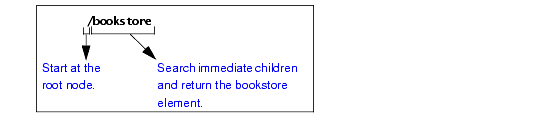
This query returns the bookstore element. Because the bookstore element is the document element, which contains all elements and attributes in the document, this query returns all marked-up text.

In the query, the initial forward slash (/) instructs the XPath processor to start its search at the root node.

Suppose you run the following query on bookstore.xml:

/book


This query returns an empty set. It searches the immediate children of the root node for an element named book. Because there is no such element, this query does not return any marked-up text. Note that this query does not return an error. The query runs successfully, but the XPath processor does not find any elements that match the query. All book elements are grandchildren of the root node, and the XPath processor only checks the children of the root node.

XML-to-HTML Mapper

Stylus Studio simplifies XML-to-HTML mapping through the industry's first and only XML to HTML mapping tool based on industry standard XSLT.

XSD Documentation Generator

Stylus Studio®'s XSD Editor includes an integrated XSD documentation generator, allowing you to easily publish XML content models defined in XSD in a convenient, HTML format.

Manufacturing

Manufacturing

XPath Editor

Stylus Studio's intelligent code-sensing, auto-completion technology, Sense:X, is XPath-aware. You'll find Sense:X for XPath in all of Stylus Studio's editors, including the XML Editor, XSLT Editor, and XQuery Editor.

Stylus Most Wanted

 
Free Stylus Studio XML Training:
W3C Member
