Cart
Cart
|
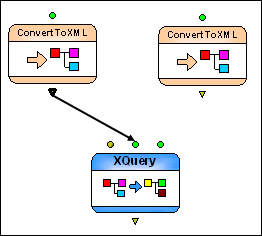
Home > Online Product Documentation > Table of Contents > Setting the XQuery Node Data Sources Setting the XQuery Node Data SourcesAlthough the XQuery code was specified with default data sources, we want the XQuery to use the data sources we defined in the two ConvertToXML nodes we created in Configuring Data Sources. We do this by connecting the output ports on the ConvertToXML nodes to the input ports on the XQuery node. To set an XQuery node's data sources:
1. With the pointer over the
Get books catalog from txt file ConvertToXML node, drag and drop the output port on the
allBooks input port on the
Extract full order information XQuery node.
Stylus Studio creates a pipe connecting the two nodes, shown in Figure 406.
2. Repeat this procedure, connecting the output port from the
Get order from EDIFACT request ConvertToXML node to the
ediOrder input port on the
Extract full order information XQuery node.
Default and Specified Port ValuesAs you can see in Figure 406, an input port can have both a default value, and a value provided by another node's output port. Note, however, that an output port's default value is never used if a pipe is connected to the port - the pipe either supplies a value or it does not, but the default value is ignored. An Alternate Way to Create ConvertToXML Nodes
It should be noted that when you add an XQuery or an XSLT document to an XML pipeline, Stylus Studio creates other nodes required to support the resulting XQuery or XSLT node, based on the XQuery or XSLT definition. For example, since
We will see this functionality in action later, when we add another XQuery document to the XML pipeline. (See Add createReport.xquery for more information.) |

XML PRODUCTIVITY THROUGH INNOVATION ™